0 votes
440 views

I have received a request for a list of Bible book names for our project. Is there a way to export this from Scripture reference settings? In PT 7, I was able to copy the list and paste it as a table, but in PT 8 I can only select one name at a time.

Paratext by (175 points) | 440 views

1 Answer

+1 vote
Best answer

I can think of a couple of ways that you could do this:

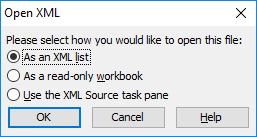
Option 1: Open the BookNames.xml file from your project folder using a right-click and then selecting “Open with…”. Then select Excel (if you have it) and then you might get a dialogue like this:
image
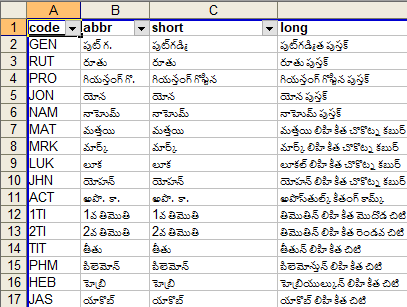
If you pick “As an XML list” then you should end up with a list in Excel that resembles something like this:
image

And you should be able to copy-and-paste whichever column that you need.

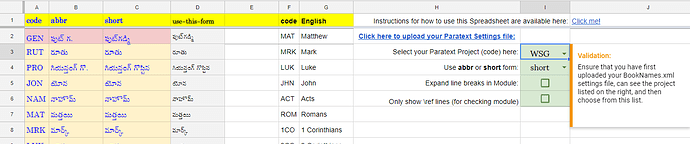
Option 2: I have a tool/process which helps people generate a Topical Index from a Google Spreadsheet. Part of the set-up for that process requires the Paratext book names in a list - so there is a simple way to upload-&-import them into a Google spreadsheet. If you just use steps 2 and 3 from these instructions, then you will get the same information (as above) in the “Start Here” tab of the Google sheet, from where you can copy-and-paste it elsewhere.

by (3.2k points)
reshown

Thank you, Mark! This is very helpful.

Just want to confirm: Did you mean to write BookNames.xml here?

Thanks @anon291708 for catching that typo. I’ve just updated it so that someone else coming along later doesn’t get tripped up.

Does this still work with PT9? When I try the first option and use Open with on the .xml file and select Excel I don't get a dialogue box it just tries to open the file and then says it doesn't recognise the format. If I open it anyway it's just the .xml format - i.e. not that legible/helpful. Same using LibreOffice Calc.

Option 2 I get : The form Upload settings is no longer accepting responses.
Found a solution myself! For the benefit of anyone else: open Libreoffice Calc/Excel. Open the BookNames.xml from within the program and I got a dialogue box asking how to display the text and then open the file. The result isn't as nice as that shown above (still looks like xlm) but at least the data is aligned in colums and each column can be selected.

A nicer looking version, as above, would still be nice but this is functional.

Related questions

0 votes
2 answers 398 views
When I switch between Find and Replace, RegEx Pal resets the book list to all books. Is this a bug or a feature? If the former, I’ll use Report a Problem.
wdavidhj 1.4k asked Sep 6, 2018
0 votes
1 answer 319 views
How can I export the TOC as a list without having to go in a copy/paste each item? Is this possible?
Clear7419 251 asked Aug 30, 2022
0 votes
1 answer 271 views
image1552 703 86.2 KB Hi, I am an administrator on a project (one of three) but I cannot save changes to ... Administrator do not. What is the solution to this? Thanks anon392948
anon392948 143 asked Feb 7, 2023
0 votes
2 answers 282 views
When you make corrections to \toc headers, the Book Names under Scripture Reference Settings don’t seem to update automatically. Is that by design?
anonymous asked Apr 10, 2015
+4 votes
4 answers 652 views
Has anyone created, or is anyone currently creating, a custom Biblical Terms Tool list that has every name in the Bible, ... the challenges, I think such a list would be helpful.
viverechristus 296 asked Jun 16, 2022
Welcome to Support Bible, where you can ask questions and receive answers from other members of the community.
Give proper recognition to those widows who are really in need.
1 Timothy 5:3
3,038 questions
5,994 answers
5,661 comments
2,022 users








