这似乎是一个常见问题! https://www.unicode.org/L2/L2017/17324-decimal-full-stop.pdf
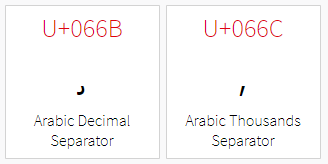
我的建议是在阿拉伯语文本项目中放置一个 changes.txt 规则,将点/句号更改为正确的阿拉伯语千位分隔符 (\u066C),以便整个数字串和标点符号都使用相同的文字系统且全部为从右到左(RTL)。这样它应该会按预期渲染。以下是一个应该能解决问题的规则:
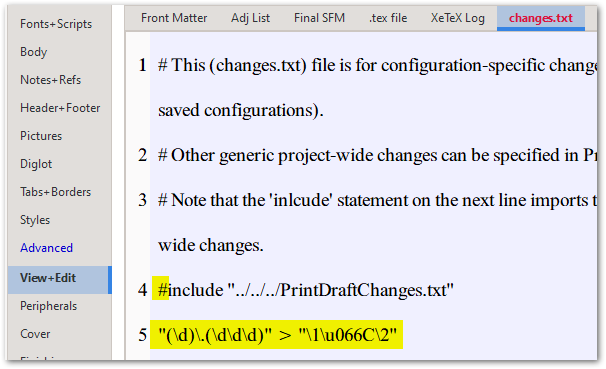
"(\d)\.(\d\d\d)" > "\1\u066C\2"
这表示,查找任何由一个数字后跟一个点再后跟三个数字组成的序列,并将其替换为第 1 个匹配项(单个数字),后跟 066C 分隔符,再后跟第 2 个匹配项(左侧找到的三个数字)。
其他人可能能够改进此正则表达式,使其也能处理包含两个分隔符的更长的数字:150.000.345。
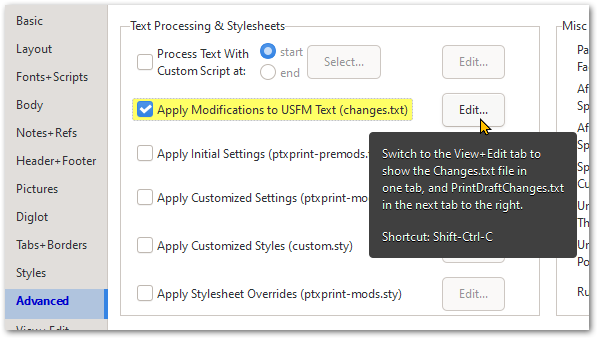
然后在出现的窗口中,粘贴上面显示在第 5 行的规则。(注意,我注释掉了对 PrintDraftChanges.txt 的引用,因为那可能不需要):
请告诉我们进展如何...
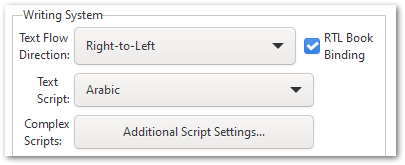
确保您的 Fonts+Scripts 设置也已配置为从右到左(RTL)和阿拉伯语:
This seems to be a common problem! https://www.unicode.org/L2/L2017/17324-decimal-full-stop.pdf
My suggestion would be to place a changes.txt rule in the Arabic text project to change the dot/period to the proper Arabic Thousands Separator (\u066C) so that the entire string of digits an the punctuation are all the same script and all RTL. It should then render as expected. Here's a rule that should do the trick:
"(\d)\.(\d\d\d)" > "\1\u066C\2"
This says, find any digit followed by a period followed by 3 digits, and replace with the 1st match (the single digit) followed by the 066C separator followed by the 2nd match (the 3 digits found on the left side).
Someone else might be able to improve this Regex to also work with much longer numbers where there are 2 separators: 150.000.345.
Then in the window that appears, paste in the above rule shown on line 5. (Note that I commented out the reference to PrintDraftChanges.txt as that's probably not needed):
Let us know how it goes...
Make sure you have also got the Fonts+Scripts settings set to do RTL and Arabic:
机器翻译自 English








