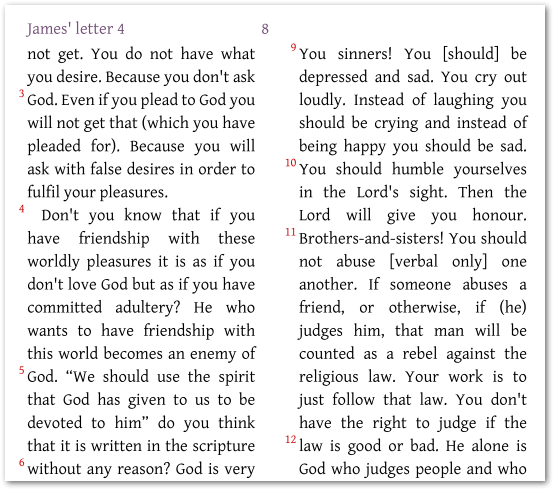
在考慮將每一節都設為新段落之前,您是否考慮過邊距節號?(如下圖所示):
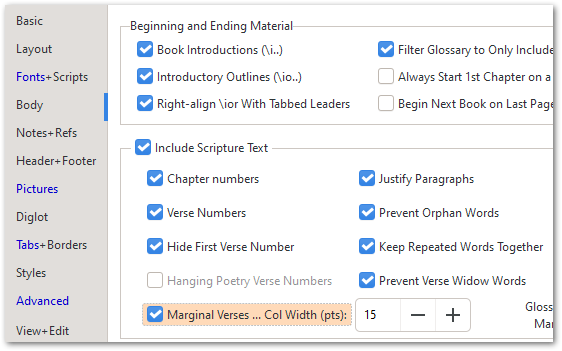
要做到這一點,您只需要在 Body 選項卡上開啟 Marginal Verses 設定:
如果您真的希望每一節都是一個新的「段落」,您可以在 changes.txt 檔案中放置一條規則(請參見 Advanced 選項卡左上角的第二個選項),然後輸入如下規則:
"\\v " > "\\p \\v "
但這會使每一節都成為一個段落。這可能不是您真正想要的。
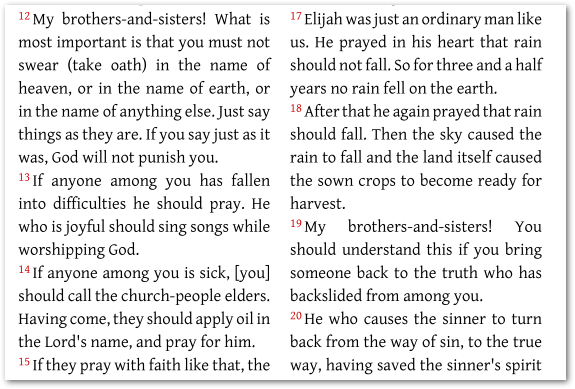
或者,您可以將它們全部設為 \m 邊距對齊段落,方法是將上面的 \p 替換為 \m,這將給您以下結果:
……但這樣您會失去真正的段落換行。因此,您可能需要保留原始的段落標記 \p,同時將其他所有標記轉換為 \m 標記:
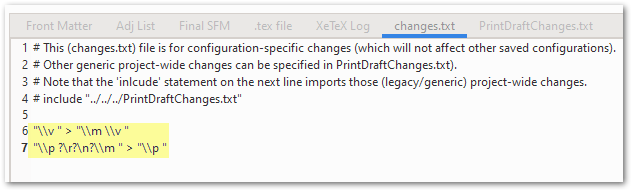
"\\v " > "\\m \\v "
"\\p ?\r?\n?\\m " > "\\p "
這將產生以下版面(我標記了實際的段落換行處):
這有幫助嗎?
Before you go down the route of making every verse a new paragraph, have you considered marginal verse numbers? (as shown here below):
To do that, all you need to do is turn on the Marginal Verses setting on the Body tab:
If you really want each verse to be a new “paragraph” then you can just place a rule in the changes.txt file (see the 2nd option at the top left of the Advanced tab) and then enter a rule like this:
"\\v " > "\\p \\v "
But that will make every verse a paragraph. Probably not what you really want.
Alternatively, you could make them all \m margin aligned paragraphs, by replacing the \p above with a \m which would give you this:
…but then you lose your real paragraph breaks. So what you probably need is to KEEP the original paragraph markers \p whilst turning all the others into \m markers:
"\\v " > "\\m \\v "
"\\p ?\r?\n?\\m " > "\\p "
Which will result in this layout (I’ve highlighted the actual para breaks):
Does that help?
機器翻譯自 English








