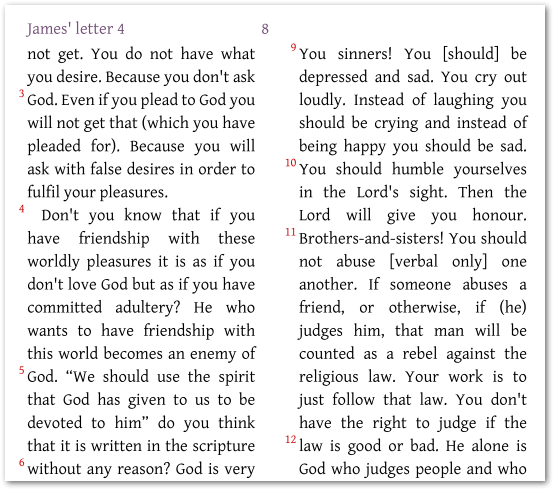
在考虑将每一节都变成新段落之前,您是否考虑过边缘节号?(如下所示):
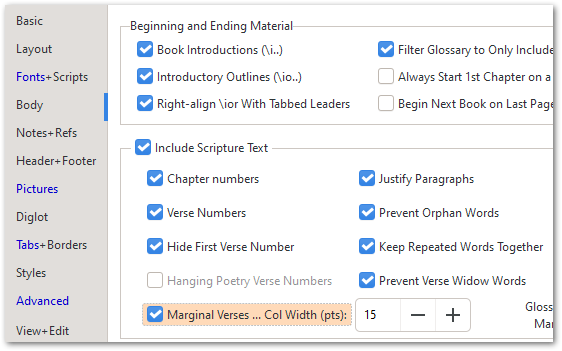
要做到这一点,您只需在 Body 选项卡上打开 Marginal Verses 设置即可:
如果您真的希望每一节都成为一个新的“段落”,那么您可以在 changes.txt 文件中放置一条规则(参见 Advanced 选项卡左上角的第二个选项),然后输入如下规则:
"\\v " > "\\p \\v "
但这会使每一节都成为一个段落。这很可能不是您真正想要的。
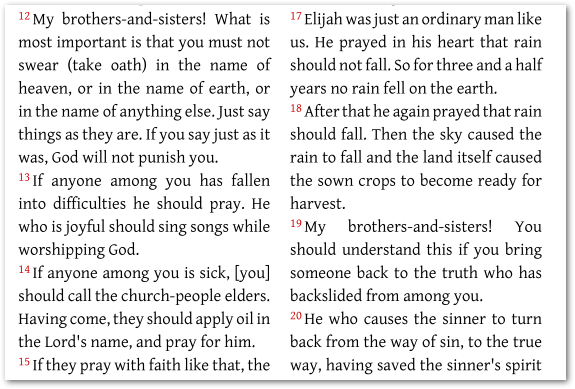
或者,您可以将它们全部设置为 \m 边缘对齐段落,方法是将上面的 \p 替换为 \m,这将得到以下结果:
……但这样您会失去真正的段落换行。因此,您可能需要保留原始的段落标记 \p,同时将其他所有标记转换为 \m 标记:
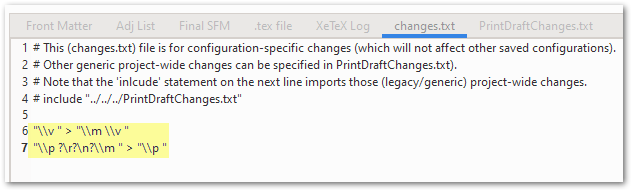
"\\v " > "\\m \\v "
"\\p ?\r?\n?\\m " > "\\p "
这将产生以下布局(我高亮了实际的段落换行处):
这有帮助吗?
Before you go down the route of making every verse a new paragraph, have you considered marginal verse numbers? (as shown here below):
To do that, all you need to do is turn on the Marginal Verses setting on the Body tab:
If you really want each verse to be a new “paragraph” then you can just place a rule in the changes.txt file (see the 2nd option at the top left of the Advanced tab) and then enter a rule like this:
"\\v " > "\\p \\v "
But that will make every verse a paragraph. Probably not what you really want.
Alternatively, you could make them all \m margin aligned paragraphs, by replacing the \p above with a \m which would give you this:
…but then you lose your real paragraph breaks. So what you probably need is to KEEP the original paragraph markers \p whilst turning all the others into \m markers:
"\\v " > "\\m \\v "
"\\p ?\r?\n?\\m " > "\\p "
Which will result in this layout (I’ve highlighted the actual para breaks):
Does that help?
机器翻译自 English








