Screen Shot 11-07-20 at 04.47 PM581×730 196 KB
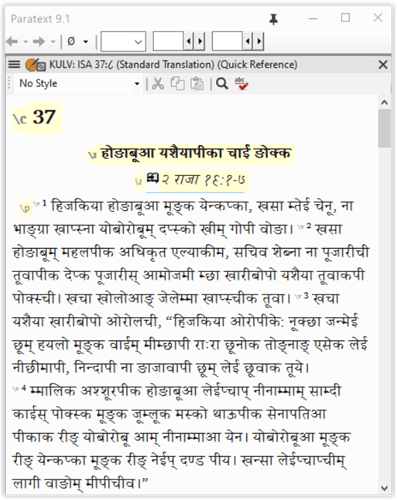
在快速参考(Quick Reference)窗口中,非罗马文字(在我的情况下是 Devanagari 文字)的平行经文显示不正确:
- 在快速参考窗口中,章和节的引用显示方式不同,即章号显示为英文,而节号显示为 Devanagari 数字。
- 由于节号以 Devanagari 数字显示,快速参考窗口中的经文始终从第 1 节开始显示,无论实际引用的是哪一节。
我的文本:2 Kgs 19:8-13 本应在快速参考窗口中显示为 Isa 37:8ff,但实际显示的是 Isa 37:1ff;请注意,窗口顶部的引用显示为 KULV: ISA 37:८(第 8 节,Devanagari 数字 ८)。Paratext 快速参考窗口在此上下文中无法识别 Devanagari 数字 ८。
Screen Shot 11-07-20 at 04.47 PM581×730 196 KB
In the Quick Reference window parallel passages are displayed incorrectly for the non-Roman (Devanagari for my case) text:
- In the Quick Ref window chapter and verse ref are displayed differently, i.e., chapter in English and verse in Devanagari number.
- Since the verse number is displayed in Devanagari, the passage in the Quick Ref window always displays the text starting with v. 1 regardless.
My text: 2 Kgs 19:8-13 should have been displayed as Isa 37:8ff in Quick Ref window, but Isa 37:1ff is displayed instead; note that the ref at the top of the window is shown as KULV: ISA 37:८ (v. 8 in Devanagari number ८). Paratext Quick Ref window does not recognize Devanagari ८ in this context.
机器翻译自 English








