+1 vote
307 views

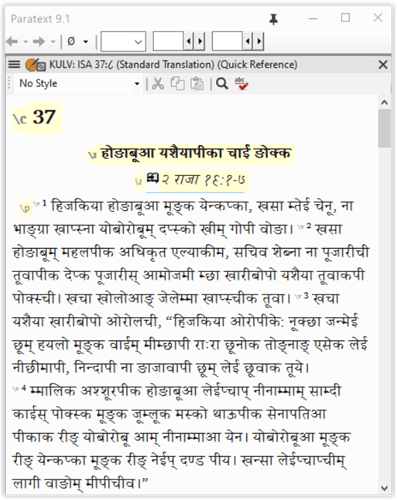
In the Quick Reference window parallel passages are displayed incorrectly for the non-Roman (Devanagari for my case) text:

  1. In the Quick Ref window chapter and verse ref are displayed differently, i.e., chapter in English and verse in Devanagari number.
  2. Since the verse number is displayed in Devanagari, the passage in the Quick Ref window always displays the text starting with v. 1 regardless.

My text: 2 Kgs 19:8-13 should have been displayed as Isa 37:8ff in Quick Ref window, but Isa 37:1ff is displayed instead; note that the ref at the top of the window is shown as KULV: ISA 37:८ (v. 8 in Devanagari number ८). Paratext Quick Ref window does not recognize Devanagari ८ in this context.


Paratext by (133 points)
reshown | 307 views

1 Answer

0 votes
Best answer

This is clearly a bug in Paratext. Please use Help > Give feedback to report this to us so we can look into it.

by [Expert]
(16.7k points)

Related questions

0 votes
0 answers 208 views
We are having difficulties in parts of Paratext 8 with non-roman front rendering. The Karenni Unicode font we are ... KB Paratext 8 Conflicts Display Problem.jpg1298 866 178 KB
anon281504 144 asked Feb 22, 2018
0 votes
1 answer 278 views
This is probably more of a feature request than a question, but I'm in the process of converting an exegetical guide (docx) to ... references: \jmp Néh 13.3|prj:CCC.Neh.13.3\jmp*
drwww 448 asked Apr 28, 2015
0 votes
2 answers 458 views
Some users only ever use the quick S/R, i.e. the one accessible from the toolbar button. If they do this, they will ... warning box if there's a new project for them to S/R?
wdavidhj 1.4k asked Jul 16, 2016
0 votes
2 answers 329 views
I'm preparing a text using the Noto Nastiliq Urdu font. But I need to use a Roman font in the changes.txt edit screen ... font, but PTXprint hung up when I tried to print. Advice?
mlucas53 148 asked Jul 22, 2024
0 votes
1 answer 219 views
In the parallel passages tool in the menu to select which passages to display it is possible to select "Not yet drafted" but ... . Is there a way to do this? Thank you, Pauline
anon380150 249 asked 6 d ago
Welcome to Support Bible, where you can ask questions and receive answers from other members of the community.
For just as each of us has one body with many members, and these members do not all have the same function, so in Christ we, though many, form one body, and each member belongs to all the others.
Romans 12:4-5
3,063 questions
6,022 answers
5,693 comments
2,036 users





