Saat ini, apa yang Anda cari tidak mungkin dilakukan menggunakan alat glosarium. Opsi yang menghasilkan tautan paling sedikit dalam teks adalah "kemunculan pertama di setiap pasal". Saya percaya alasannya adalah bahwa sebagian besar pembaca tidak membaca seluruh kitab sekaligus, melainkan lebih mungkin membaca beberapa pasal sekaligus.
Untuk menghapus tautan \w…\w* yang tidak diinginkan dari teks, "putuskan tautan" semua penampilan dengan memfilter alat Biblical Terms (Istilah Alkitabiah) untuk menampilkan istilah yang ingin Anda putuskan tautannya. Kemudian, pergi ke Menu Biblical terms > Edit > Unlink selected renderings from glossary. (Atau "unlink all renderings" jika Anda ingin menghapus semua entri glosarium dari teks proyek Anda.)
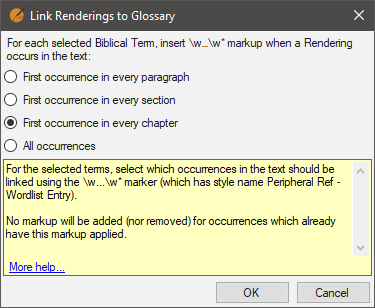
Selanjutnya, filter alat Biblical terms ke istilah yang ingin Anda buat tautannya dan pilih Menu Biblical terms > Edit > Link selected renderings to glossary, pilih opsi yang Anda sukai dari pilihan berikut:
Jika Anda ingin memeriksa kitab atau pasal untuk entri glosarium, berikut adalah regex yang berguna untuk digunakan di Edit > Find:
regex:\w .+?\w*
Hasilnya akan terlihat seperti ini:
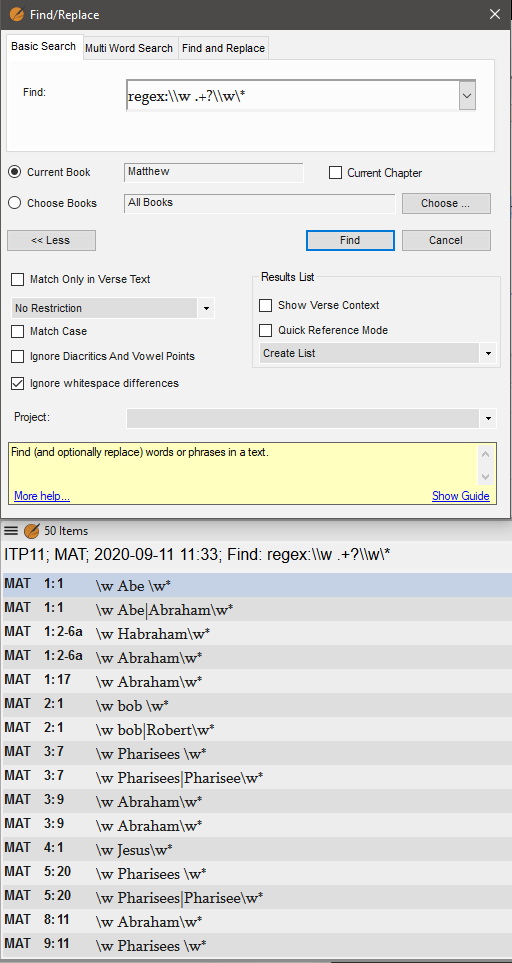
image512×963 29 KB
Orang lain mungkin memiliki tips profesional lebih lanjut untuk Glosarium. Saya tidak memiliki banyak pengalaman dengan glosarium.
Currently, what you’re looking for isn’t possible using the glossary tools. The option which creates the fewest links in the text is “first occurrence in every chapter”. I believe the rationale for that is that most readers don’t read whole books at a time, more likely a few chapters at a time.
To remove unwanted \w…\w* links from the text, “unlink” all renderings by filtering the Biblical Terms tool to show the terms you wish to unlink. Then, go to Biblical terms menu > Edit > Unlink selected renderings from glossary. (Or “unlink all renderings” if you want to remove all glossary entries from your project text.)
Next, filter the Biblical terms tool to the terms you want to create links for and choose Biblical terms menu > Edit > Link selected renderings to glossary, choose the option you prefer from these choices:
If you want check a book or chapter for glossary entries, here is a helpful regex to use in Edit > Find:
regex:\w .+?\w*
Results will look something like this:
image512×963 29 KB
Others may have more pro tips for Glossaries. I don’t have much experience of them.
Diterjemahkan secara otomatis dari English








