您可能遇到了 Windows 的一個怪癖。記事本預設會將檔案儲存為 .txt 副檔名。請檢查您的檔案是否實際命名為 custom.sty.txt 和 custom.vrs.txt。如果是,請將它們重新命名為 custom.sty 和 custom.vrs,去掉結尾的 .txt。
Windows 也可能隱藏了副檔名,因此看起來像 custom.sty 的檔案實際上是 custom.sty.txt。
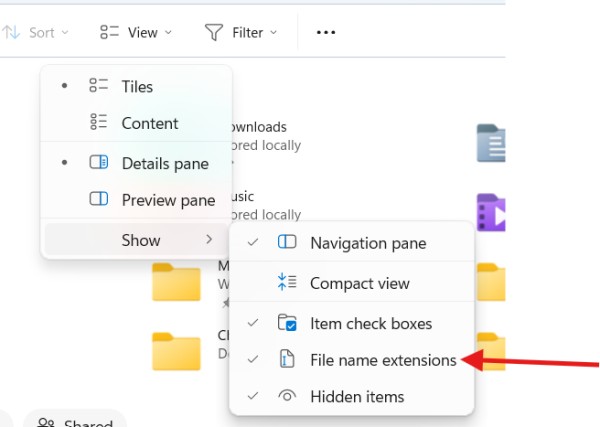
在檔案檢視器中,您可以確保看到完整的檔案名稱。點擊「檢視」,然後選擇「顯示」並勾選「檔案名稱副檔名」。
You may be blocked by a Windows quirk. Notepad by default will save a file with the .txt extension. Check if your files are actually named custom.sty.txt and custom.vrs.txt. If they are, rename them to custom.sty and custom.vrs without the .txt on the end.
Windows may also be hiding the extension from you so what looks like custom.sty is really custom.sty.txt.
In File Viewer, you can make sure you are seeing the full file name. Click "View", then choose "show" and select "File name extensions".
機器翻譯自 English








