आपको Windows की एक विशेषता (quirk) के कारण रुकावट हो सकती है। Notepad डिफ़ॉल्ट रूप से फ़ाइल को .txt एक्सटेंशन के साथ सेव करता है। जांचें कि क्या आपकी फ़ाइलें वास्तव में custom.sty.txt और custom.vrs.txt नाम से हैं। अगर हैं, तो उन्हें अंत में .txt के बिना custom.sty और custom.vrs नाम से बदलें।
Windows एक्सटेंशन को आपसे छुपा भी रहा हो सकता है, इसलिए जो custom.sty दिख रहा है, वह वास्तव में custom.sty.txt हो सकता है।
फ़ाइल व्यूअर (File Viewer) में, आप यह सुनिश्चित कर सकते हैं कि आपको पूरा फ़ाइल नाम दिख रहा है। "View" पर क्लिक करें, फिर "show" चुनें और "File name extensions" का चयन करें।
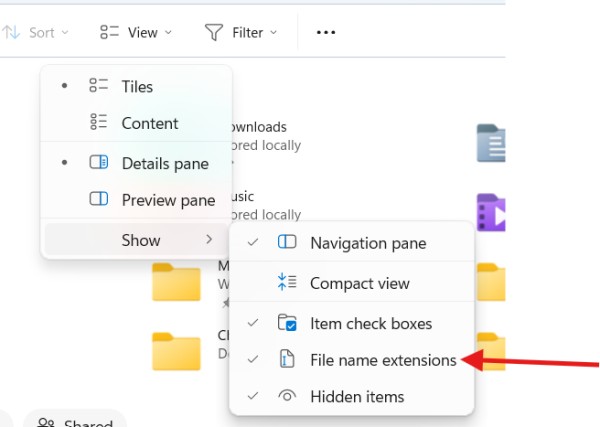
You may be blocked by a Windows quirk. Notepad by default will save a file with the .txt extension. Check if your files are actually named custom.sty.txt and custom.vrs.txt. If they are, rename them to custom.sty and custom.vrs without the .txt on the end.
Windows may also be hiding the extension from you so what looks like custom.sty is really custom.sty.txt.
In File Viewer, you can make sure you are seeing the full file name. Click "View", then choose "show" and select "File name extensions".
English से मशीन-अनुवादित








