Vous êtes peut-être bloqué par une particularité de Windows. Par défaut, le Bloc-notes enregistre un fichier avec l'extension .txt. Vérifiez si vos fichiers sont réellement nommés custom.sty.txt et custom.vrs.txt. Si c'est le cas, renommez-les en custom.sty et custom.vrs sans le .txt à la fin.
Windows peut également masquer l'extension, de sorte que ce qui ressemble à custom.sty est en réalité custom.sty.txt.
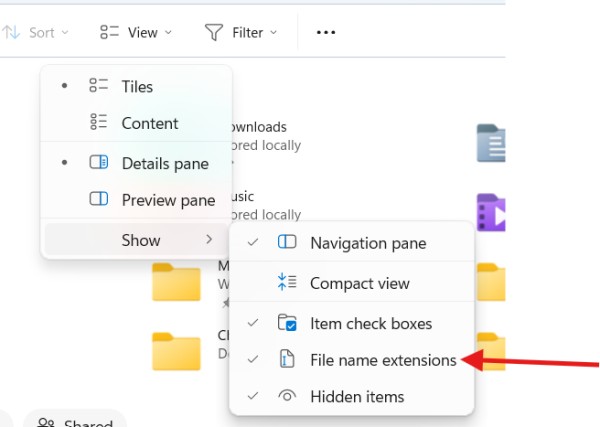
Dans l'Explorateur de fichiers, vous pouvez vous assurer de voir le nom de fichier complet. Cliquez sur « Affichage », puis choisissez « Afficher » et sélectionnez « Extensions de noms de fichiers ».
You may be blocked by a Windows quirk. Notepad by default will save a file with the .txt extension. Check if your files are actually named custom.sty.txt and custom.vrs.txt. If they are, rename them to custom.sty and custom.vrs without the .txt on the end.
Windows may also be hiding the extension from you so what looks like custom.sty is really custom.sty.txt.
In File Viewer, you can make sure you are seeing the full file name. Click "View", then choose "show" and select "File name extensions".
Traduit automatiquement depuis English








