Es posible que esté bloqueado por una peculiaridad de Windows. Bloc de notas guarda los archivos con la extensión .txt de forma predeterminada. Compruebe si sus archivos se llaman realmente custom.sty.txt y custom.vrs.txt. Si es así, renómbralos a custom.sty y custom.vrs sin la extensión .txt al final.
Windows también puede estar ocultándote la extensión, de modo que lo que parece custom.sty es en realidad custom.sty.txt.
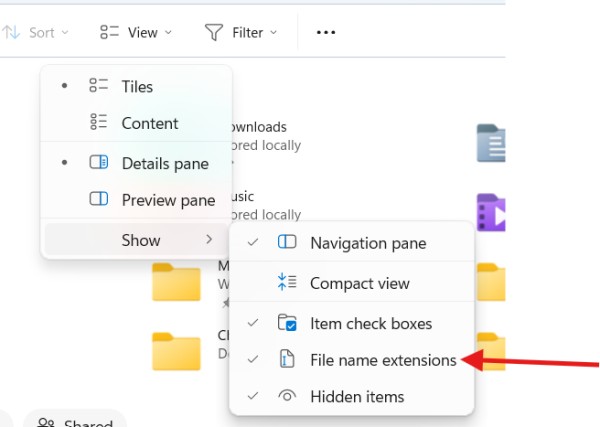
En el Visor de archivos, puede asegurarse de que está viendo el nombre completo del archivo. Haga clic en "Ver", luego elija "Mostrar" y seleccione "Extensiones de nombres de archivo".
You may be blocked by a Windows quirk. Notepad by default will save a file with the .txt extension. Check if your files are actually named custom.sty.txt and custom.vrs.txt. If they are, rename them to custom.sty and custom.vrs without the .txt on the end.
Windows may also be hiding the extension from you so what looks like custom.sty is really custom.sty.txt.
In File Viewer, you can make sure you are seeing the full file name. Click "View", then choose "show" and select "File name extensions".
Traducción automática desde English








