Anda mungkin terhalang oleh keanehan Windows. Notepad secara default akan menyimpan file dengan ekstensi .txt. Periksa apakah file Anda benar-benar bernama custom.sty.txt dan custom.vrs.txt. Jika iya, ubah namanya menjadi custom.sty dan custom.vrs tanpa .txt di akhir.
Windows juga mungkin menyembunyikan ekstensi dari Anda sehingga yang terlihat seperti custom.sty sebenarnya adalah custom.sty.txt.
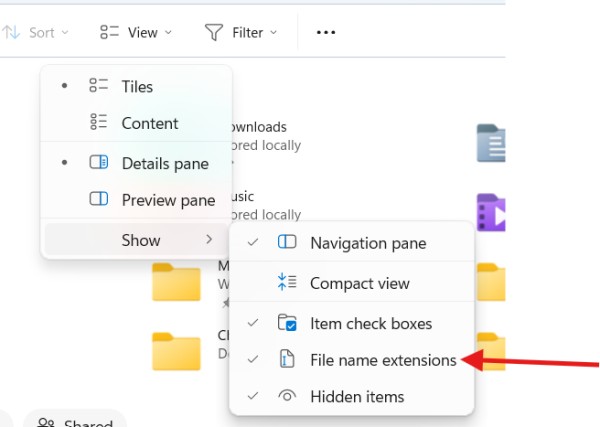
Di File Viewer, Anda dapat memastikan bahwa Anda melihat nama file lengkap. Klik "View", lalu pilih "show" dan pilih "File name extensions".
You may be blocked by a Windows quirk. Notepad by default will save a file with the .txt extension. Check if your files are actually named custom.sty.txt and custom.vrs.txt. If they are, rename them to custom.sty and custom.vrs without the .txt on the end.
Windows may also be hiding the extension from you so what looks like custom.sty is really custom.sty.txt.
In File Viewer, you can make sure you are seeing the full file name. Click "View", then choose "show" and select "File name extensions".
Diterjemahkan secara otomatis dari English








