该功能需要更新才能在 Android 上再次正常工作。必须使用 9.5.18.66 或更高版本
Paratext Lite 的 [获取资源 -> 本地] 功能允许从同一局域网内的设备安装资源。它旨在用于互联网访问不可靠或昂贵的情况。
* 资源必须已经安装在桌面版 Paratext Lite 中。*
* 两台设备必须位于同一局域网*
步骤 1.
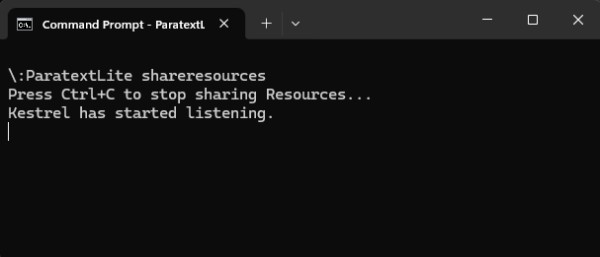
在台式计算机上,从命令行运行 paratextlite:
paratextLite shareresources
步骤 2.
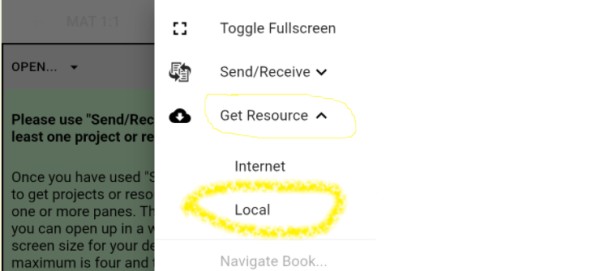
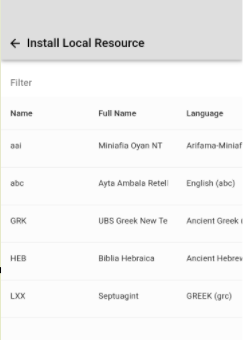
在另一台您想要安装资源的 Paratext Lite 设备上,使用 [获取资源 -> 本地] 功能,这将允许从步骤一中使用的台式计算机安装资源。
故障排除
检查 Android 版本是否为 9.5.18.66 或更高版本。
如果“安装本地资源”未显示任何项目,请检查台式计算机上运行的防火墙是否阻止了 UDP 数据包或 TCP 端口(默认使用端口 5555)
当设备连接时,命令行“paratextLite shareresources”会显示传入连接。如果没有显示任何内容,则可能是防火墙/网络导致的问题。
The feature required an update so that it worked on Android again. Must use 9.5.18.66 or newer
The Paratext Lite [Get Resources -> Local] feature allows installing resources from a device on the same local network. It's is intended to be used when internet access is unreliable or expensive.
* Resources must already be installed in the desktop version of Paratext Lite.*
* Both devices must be on the same local network*
Step 1.
On the desktop computer, run paratextlite from the command line:
paratextLite shareresources
Step 2.
On other Paratext Lite device, where you want to install resources, use the [Get Resources -> Local] feature, which will allow installing resources from the desktop machine used in step one.
Trouble shooting
Check that the Android version is 9.5.18.66 or newer.
If "Install Local Resource" doesn't display any projects, check that a firewall running on the desktop computer isn't blocking UDP packets or the TCP port (by default port 5555 is used)
The command line "paratextLite shareresources" will display incoming connections when a device connects. If nothing displays then firewall/network are likely the cause.
机器翻译自 English








