0 votes

I'm setting up a Wasta 24.04 laptop with Paratext Lite v 9.5.18.30. Our internet has been very poor so I'm transferring projects from another PT Lite laptop via Send/Receive > Direct, which is easier than using Send/Receive > USB. (I'm aware that there can be problems with accessing USB drives attached to Android tablets, which is a different issue, I think.)

To transfer Resources to the new laptop, I believe it has "always worked" to just copy resource files into the Paratext9Projects/_Resources folder. But PT Lite has a Local option under Get Resource on the main menu, so I figured this might work better than direct copying. But when I select Get Resource > Local PT Lite never finds any resources, from _Resources/ on a USB flash drive, or from ~//Desktop_Resources/, or from ~/snap/_Resources. I did check to be sure the snap connection :removable-media is active, and the flash drive is working fine. Same problem happens on another Wasta 24.04 laptop running PT Lite 9.5.18.43.

It did work fine just to copy/paste Resources into ~/Paratext9Projects/_Resources/, so this is more of a general suggestion: If Get Resource > Local doesn't work, it's confusing to see it as an option in PT Lite's menu. 

Paratext Lite by (670 points)
edited by
I will try and get to a full answer for this, but "Get Resources > Local" works in conjunction with the paratextlite cmd line: "

paratextlite shareresources --help
Description:
  allow other devices to install resources using this machine as a source.

Usage:
  ParatextLite shareresources [options]"  ( ie. allows sharing resources from a Desktop ParatextLite to android device on the same local network.)

1 Answer

+1 vote
Best answer

The feature required an update so that it worked on Android again. Must use 9.5.18.66 or newer

The Paratext Lite [Get Resources -> Local] feature allows installing resources from a device on the same local network. It's is intended to be used when internet access is unreliable or expensive.

* Resources must already be installed in the desktop version of Paratext Lite.*

* Both devices must be on the same local network*

Step 1.

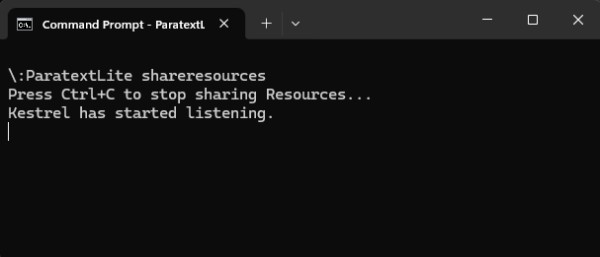
On the desktop computer, run paratextlite from the command line: 

paratextLite shareresources
image

Step 2.

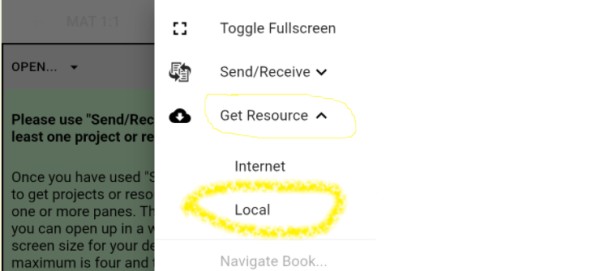
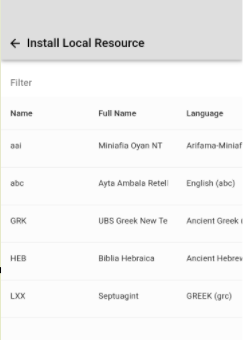
On other Paratext Lite device, where you want to install resources, use the [Get Resources -> Local] feature, which will allow installing resources from the desktop machine used in step one.
image

image

Trouble shooting

Check that the Android version is 9.5.18.66 or newer.

If "Install Local Resource" doesn't display any projects, check that a firewall running on the desktop computer isn't blocking UDP packets or the TCP port  (by default port 5555 is used)

The command line "paratextLite shareresources" will display incoming connections when a device connects. If nothing displays then firewall/network are likely the cause.


by [Moderator]
(2.4k points)

selected by
Many thanks--this is great! Along with S/R via Direct Wifi, PT Lite on Android again has full import and synchronization capabilities (since Android no longer allows USB transfers).
I am not seeing the dependencies of Source Languages and of ESV+: SDBG, SDBH, BDBA, the IMG_* files, etc. At least these are missing from my Android PTLite machine. Source Languages works but OT and NT each have only one dictionary instead of 3-4.

Related: Would it be possible to add the contents of _Dictionaries to the available resources and visible to the local installer?
In Paratext Lite (Android: 9.5.18.68 and newer, Linux: 9.5.19.9 and newer) I've added some experimental support for installing more resource types via Install Resource -> Local). Note: using an older Android versions will display the expanded resources list, but they won't install correctly - The Android version may take a couple of weeks before it's released.).
Welcome to Support Bible, where you can ask questions and receive answers from other members of the community.
Just as a body, though one, has many parts, but all its many parts form one body, so it is with Christ.
1 Corinthians 12:12
3,036 questions
5,990 answers
5,659 comments
2,020 users




