Fitur ini memerlukan pembaruan agar berfungsi di Android lagi. Harus menggunakan 9.5.18.66 atau lebih baru
Fitur Paratext Lite [Get Resources -> Local] memungkinkan instalasi sumber daya dari perangkat di jaringan lokal yang sama. Fitur ini dimaksudkan untuk digunakan ketika akses internet tidak andal atau mahal.
* Sumber daya harus sudah diinstal di versi desktop Paratext Lite.*
* Kedua perangkat harus berada di jaringan lokal yang sama*
Langkah 1.
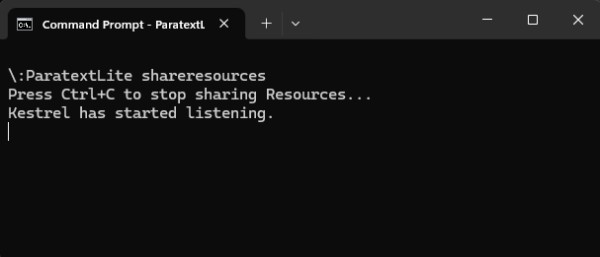
Pada komputer desktop, jalankan paratextlite dari baris perintah:
paratextLite shareresources
Langkah 2.
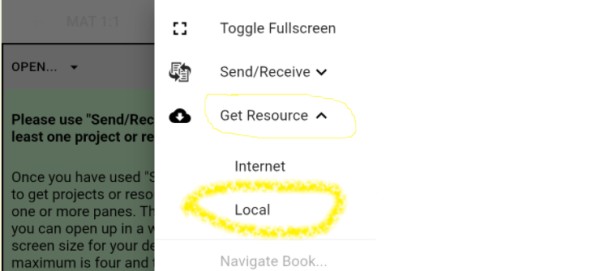
Pada perangkat Paratext Lite lain, tempat Anda ingin menginstal sumber daya, gunakan fitur [Get Resources -> Local] , yang akan memungkinkan instalasi sumber daya dari mesin desktop yang digunakan di langkah satu.
Pemecahan masalah
Periksa apakah versi Android adalah 9.5.18.66 atau lebih baru.
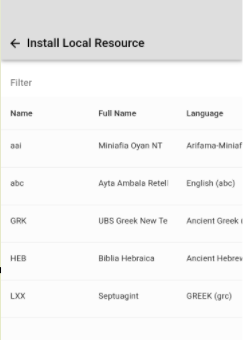
Jika "Install Local Resource" tidak menampilkan proyek apa pun, periksa apakah firewall yang berjalan di komputer desktop tidak memblokir paket UDP atau port TCP (secara default port 5555 digunakan)
Baris perintah "paratextLite shareresources" akan menampilkan koneksi masuk ketika perangkat terhubung. Jika tidak ada yang ditampilkan, kemungkinan besar firewall/jaringan adalah penyebabnya.
The feature required an update so that it worked on Android again. Must use 9.5.18.66 or newer
The Paratext Lite [Get Resources -> Local] feature allows installing resources from a device on the same local network. It's is intended to be used when internet access is unreliable or expensive.
* Resources must already be installed in the desktop version of Paratext Lite.*
* Both devices must be on the same local network*
Step 1.
On the desktop computer, run paratextlite from the command line:
paratextLite shareresources
Step 2.
On other Paratext Lite device, where you want to install resources, use the [Get Resources -> Local] feature, which will allow installing resources from the desktop machine used in step one.
Trouble shooting
Check that the Android version is 9.5.18.66 or newer.
If "Install Local Resource" doesn't display any projects, check that a firewall running on the desktop computer isn't blocking UDP packets or the TCP port (by default port 5555 is used)
The command line "paratextLite shareresources" will display incoming connections when a device connects. If nothing displays then firewall/network are likely the cause.
Diterjemahkan secara otomatis dari English








