您看到的結果有兩種情況。1) 未知單詞被標記為 @。這是預期行為。2) 數字在逗號後出現空格。這是因為 FLEx 將逗號視為標點符號,從而將數字分割成兩個單詞所致。我認為我們對此無能為力。
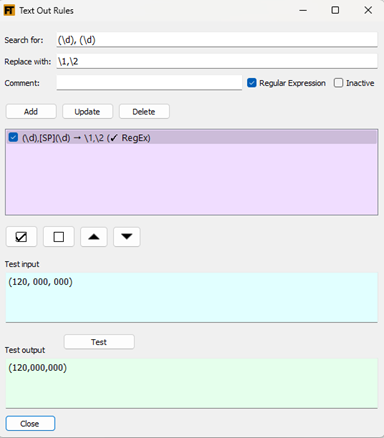
我建議使用一種文本輸出規則(text-out rule)來移除數字後跟逗號、再跟數字之間的空格。該規則應如下所示:
至於 @ 符號,有幾種選項。我看到您有一條移除 @ 的文本輸出規則。這行得通。或者,您可以使用此處顯示的設置來自動清理未知單詞符號。

這樣做的好處是,它還能清理單詞後跟數字的情況。例如:lieben1.1 > lieben。
使用任一方法,您都可以通過以下複選框來控制您在 Live Rule Tester 的綜合測試(synthesized)中看到的內容。

There are two results you are seeing. 1) Unknown words are getting marked with an @. That’s expected. 2) The number ends up with space after the comma. This is the by-product of FLEx seeing the comma as punctuation and dividing the number into two words. I don’t think there’s much we can do about it.
I suggest a workaround by using a text-out rule to remove spaces after a digit then comma and before a digit. The rule would look like this:
As for the @ signs, there’s a couple options. I saw you had a text out rule that removed the @. That works. Or you can use the setting shown here to automatically clean up unknown word symbols.
The advantage of this is that it will also clean up cases of a word with numbers after it. E.g. lieben1.1 > lieben.
Using either method, you can control what you see in the Live Rule Tester’s synthesized with the following checkboxes.
機器翻譯自 English








