Vous observez deux résultats. 1) Les mots inconnus sont marqués d'un @. C'est prévu. 2) Le nombre se termine par un espace après la virgule. C'est un effet secondaire de FLEx qui considère la virgule comme une ponctuation et divise le nombre en deux mots. Je ne pense pas qu'il y ait grand-chose à faire à ce sujet.
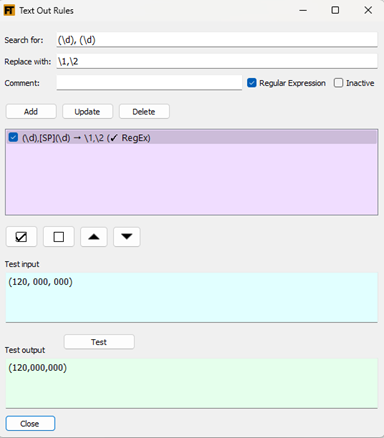
Je suggère une solution de contournement en utilisant une règle de sortie de texte pour supprimer les espaces après un chiffre suivi d'une virgule et avant un chiffre. La règle ressemblerait à ceci :
Quant aux signes @, il y a quelques options. J'ai vu que vous aviez une règle de sortie de texte qui supprimait le @. Cela fonctionne. Ou vous pouvez utiliser le paramètre montré ici pour nettoyer automatiquement les symboles de mots inconnus.

L'avantage de cette méthode est qu'elle nettoiera également les cas où un mot est suivi de chiffres. Par exemple : lieben1.1 > lieben.
En utilisant l'une ou l'autre méthode, vous pouvez contrôler ce que vous voyez dans la synthèse du Live Rule Tester à l'aide des cases à cocher suivantes.

There are two results you are seeing. 1) Unknown words are getting marked with an @. That’s expected. 2) The number ends up with space after the comma. This is the by-product of FLEx seeing the comma as punctuation and dividing the number into two words. I don’t think there’s much we can do about it.
I suggest a workaround by using a text-out rule to remove spaces after a digit then comma and before a digit. The rule would look like this:
As for the @ signs, there’s a couple options. I saw you had a text out rule that removed the @. That works. Or you can use the setting shown here to automatically clean up unknown word symbols.
The advantage of this is that it will also clean up cases of a word with numbers after it. E.g. lieben1.1 > lieben.
Using either method, you can control what you see in the Live Rule Tester’s synthesized with the following checkboxes.
Traduit automatiquement depuis English








