Há dois resultados que você está vendo. 1) Palavras desconhecidas estão sendo marcadas com um @. Isso é esperado. 2) O número termina com um espaço após a vírgula. Isso é um subproduto do FLEx ver a vírgula como pontuação e dividir o número em duas palavras. Não acho que possamos fazer muito a respeito.
Sugiro uma solução alternativa usando uma regra de saída de texto para remover espaços após um dígito, vírgula e antes de um dígito. A regra ficaria assim:
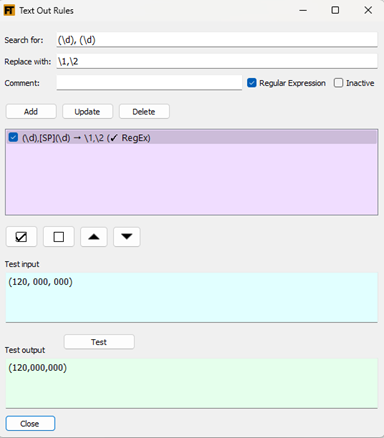
Quanto aos sinais de @, há algumas opções. Vi que você tinha uma regra de saída de texto que removia o @. Isso funciona. Ou você pode usar a configuração mostrada aqui para limpar automaticamente os símbolos de palavras desconhecidas.

A vantagem disso é que também limpará casos de palavras com números após elas. Ex.: lieben1.1 > lieben.
Usando qualquer um dos métodos, você pode controlar o que vê no sintetizado do Live Rule Tester com as seguintes caixas de seleção.

There are two results you are seeing. 1) Unknown words are getting marked with an @. That’s expected. 2) The number ends up with space after the comma. This is the by-product of FLEx seeing the comma as punctuation and dividing the number into two words. I don’t think there’s much we can do about it.
I suggest a workaround by using a text-out rule to remove spaces after a digit then comma and before a digit. The rule would look like this:
As for the @ signs, there’s a couple options. I saw you had a text out rule that removed the @. That works. Or you can use the setting shown here to automatically clean up unknown word symbols.
The advantage of this is that it will also clean up cases of a word with numbers after it. E.g. lieben1.1 > lieben.
Using either method, you can control what you see in the Live Rule Tester’s synthesized with the following checkboxes.
Tradução automática de English








