आपको दो परिणाम दिखाई दे रहे हैं। 1) अज्ञात शब्दों को @ चिह्न से चिह्नित किया जा रहा है। यह अपेक्षित है। 2) अंक अल्पविराम के बाद एक स्थान (space) के साथ समाप्त हो जाता है। यह FLEx का उप-उत्पाद है, जो अल्पविराम को विराम चिह्न (punctuation) मानकर अंक को दो शब्दों में विभाजित कर देता है। मुझे नहीं लगता कि हम इसके बारे में बहुत कुछ कर सकते हैं।
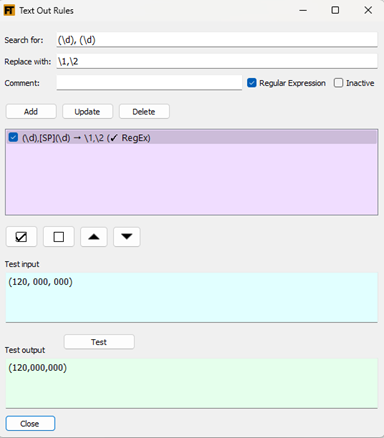
मैं एक कार्य-समाधान (workaround) सुझाता हूँ जिसमें एक text-out नियम का उपयोग करके अंक के बाद अल्पविराम और अंक से पहले स्थान (space) को हटाया जाए। नियम इस प्रकार दिखेगा:
@ चिह्नों के मामले में, कुछ विकल्प हैं। मैंने देखा कि आपके पास एक text out नियम था जो @ को हटा देता था। वह काम करता है। या आप यहाँ दिखाए गए सेटिंग का उपयोग कर सकते हैं ताकि अज्ञात शब्द चिह्नों को स्वतः साफ किया जा सके।

इसका लाभ यह है कि यह शब्द के बाद अंकों वाले मामलों को भी साफ करेगा। उदाहरण के लिए: lieben1.1 > lieben.
दोनों विधियों का उपयोग करके, आप Live Rule Tester के संश्लेषित (synthesized) में जो दिखाई देता है, उसे निम्नलिखित चेकबॉक्स के माध्यम से नियंत्रित कर सकते हैं।

There are two results you are seeing. 1) Unknown words are getting marked with an @. That’s expected. 2) The number ends up with space after the comma. This is the by-product of FLEx seeing the comma as punctuation and dividing the number into two words. I don’t think there’s much we can do about it.
I suggest a workaround by using a text-out rule to remove spaces after a digit then comma and before a digit. The rule would look like this:
As for the @ signs, there’s a couple options. I saw you had a text out rule that removed the @. That works. Or you can use the setting shown here to automatically clean up unknown word symbols.
The advantage of this is that it will also clean up cases of a word with numbers after it. E.g. lieben1.1 > lieben.
Using either method, you can control what you see in the Live Rule Tester’s synthesized with the following checkboxes.
English से मशीन-अनुवादित








