是的,有几种方法可以实现您要求的效果。首先决定您是想创建一个让元素保持在一起(因此可以是一个更通用的规则,适用于所有地方)的规则,还是一个强制单词分开(往往非常特定于位置)的规则。

在第 6 行(目前用 # 注释掉了),我展示了如何使用 ~ 波浪号将两个单词保持在同一行。
在您的情况下,最简单的规则看起来像这样:
at GEN 19:0 'i Sodom' > 'i~Sodom'
在第 8 行,我展示了一个规则,它鼓励在特定点换行,使用 // 代替空格。同样,这看起来像这样:
at GEN 19:0 'tou i' > 'tou//i'
请注意,由于我们对位置 GEN 19:0(= 第 19 章中第 1 节之前的部分)非常具体,我们可以只使用单词的一部分(mamantou);而且,虽然我通常喜欢使用 (capture) (groups) 和 "\1//\2" 使用编号组替换,但这最终会变得更复杂——因此我建议使用上面简单的规则。
有趣的是,有时 // 由于计算的惩罚等原因不会断开行,您可能需要使用强制换行符(Line Separator),如第 9 行所示。更奇怪的是,普通的换行符(\u000A)完全不起作用——但我不知道为什么。也许其他人可以解释一下。
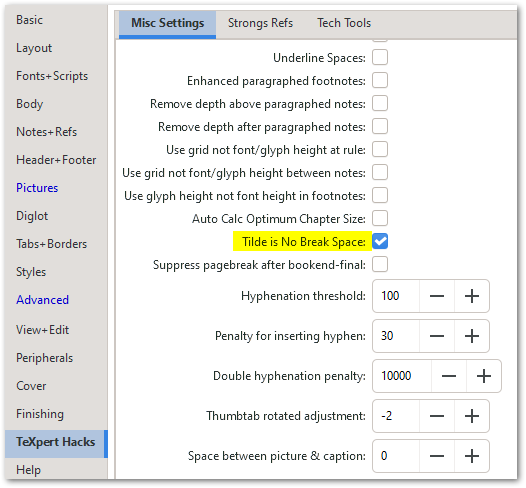
还有另一个复杂的问题——如果您试图使用 ~ 波浪号但它不起作用,请查看 TeXpert Hacks,看看是否启用了此设置(这应该会有帮助):
Yes, there are several ways of doing what you are asking for. First decide whether you want to create a rule that KEEPS elements together (and could therefore be a more generic rule to apply everywhere), or one that forces words to SPLIT APART (tends to be very location specific).
In line 6 (currently commented out with a #) I have shown how you would keep 2 words together using the ~ tilde in order to force them onto the same line.
In your case the simplest rule would look like this:
at GEN 19:0 'i Sodom' > 'i~Sodom'
In line 8 I have shown a rule that encourages the line to break at a certain point using the // instead of a space. Again, this would look like this:
at GEN 19:0 'tou i' > 'tou//i'
Notice that because we're being so specific with the location GEN 19:0 (= the part of chapter 19 which comes BEFORE verse 1) we can use just part of the word (mamantou); and although I usually like the use of (capture) (groups) and "\1//\2" using numbered group replacements, it ends up as more work - hence the simple rule that I suggest above.
Interestingly, sometimes // won't split the line due to calculated penalties etc. and you might need to use a forced Line Separator instead, as seen on line 9. And even more curious is that the regular Line Feed (\u000A) didn't work at all - but I have no idea why. Perhaps someone else can explain that.
There is one other complication - if you are trying to use ~ tilde but it isn't working, have a look at the TeXpert Hacks to see if this setting is enabled (which should help):
机器翻译自 English








