Мы только что добавили эту функцию (начиная с версии 2.3.23). Чтобы маркер появился, вам нужно добавить следующую строку в ваш файл ptxprint-mods.tex:
\def\marginversemarker{*}
где * — это любой маркер, который вы хотите использовать. Обратите внимание, что при необходимости вы также можете добавить кернинг (пробел) после маркера. Например, если вы хотите, чтобы тире «-» служило маркером начала стиха, а перед первым словом следующего стиха был отступ в 1pt, используйте это:
\def\marginversemarker{-\kern 1pt}
В настоящее время это работает везде (даже в начале абзаца/строки), что может быть не идеально, но на данный момент мы дошли только до этого.
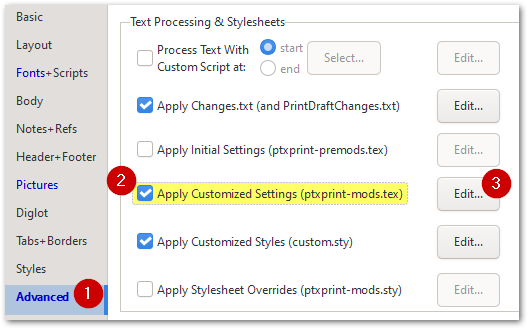
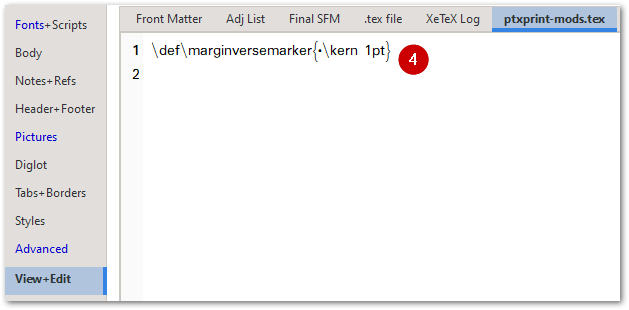
Обратите внимание, что для изменения размера, цвета или стиля (включая повышение или понижение знака) вы можете изменить маркер \zmvm, как показано здесь:
В итоге это выглядит так:
We have just added this as a feature (as of version 2.3.23) . To enable the marker to appear, you will need to add this line to your ptxprint-mods.tex file:
\def\marginversemarker{*}
where * is whatever marker you want to use. Note that you can also add a kerning space after the marker if required. So, for example, if you want a dash ‘-’ to be the marker to show where the verse starts and then have a 1pt space before the 1st word of the next verse, then use this:
\def\marginversemarker{-\kern 1pt}
Currently this does it everywhere (even at the start of a paragraph/line) which may not be ideal, but it is as far as we’ve got so far.
Note that to change the size, color or styling (including raising or lowering the mark), you can change the \zmvm marker as shown here:
This ends up looking like this:








