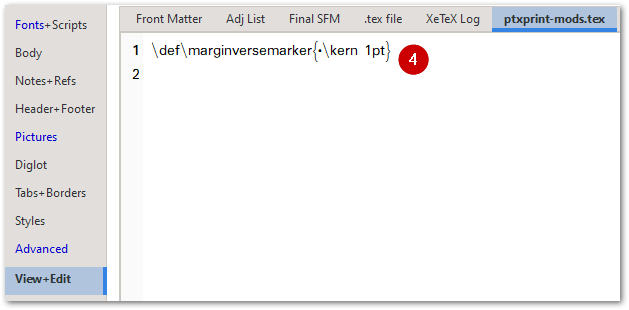
Acabamos de añadir esto como una función (a partir de la versión 2.3.23). Para que aparezca el marcador, deberá añadir esta línea a su archivo ptxprint-mods.tex:
\def\marginversemarker{*}
donde * es el marcador que desee utilizar. Tenga en cuenta que también puede añadir un espacio de kerning después del marcador si es necesario. Por ejemplo, si desea que un guion ‘-’ sea el marcador para mostrar dónde comienza el versículo y luego tener un espacio de 1pt antes de la 1.ª palabra del siguiente versículo, utilice esto:
\def\marginversemarker{-\kern 1pt}
Actualmente, esto se hace en todas partes (incluso al inicio de un párrafo/línea), lo cual puede no ser ideal, pero es hasta donde hemos llegado por ahora.
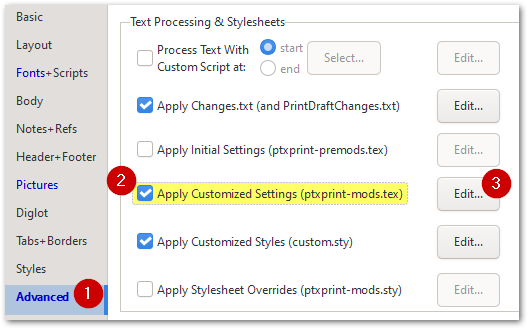
Tenga en cuenta que, para cambiar el tamaño, el color o el estilo (incluido elevar o bajar la marca), puede cambiar el marcador \zmvm como se muestra aquí:
El resultado final se ve así:
We have just added this as a feature (as of version 2.3.23) . To enable the marker to appear, you will need to add this line to your ptxprint-mods.tex file:
\def\marginversemarker{*}
where * is whatever marker you want to use. Note that you can also add a kerning space after the marker if required. So, for example, if you want a dash ‘-’ to be the marker to show where the verse starts and then have a 1pt space before the 1st word of the next verse, then use this:
\def\marginversemarker{-\kern 1pt}
Currently this does it everywhere (even at the start of a paragraph/line) which may not be ideal, but it is as far as we’ve got so far.
Note that to change the size, color or styling (including raising or lowering the mark), you can change the \zmvm marker as shown here:
This ends up looking like this:
Traducción automática desde English








