我們建議將 Paratext 安裝在預設位置,即 C:\My Paratext 9 Projects。
要變更 My Paratext Projects 資料夾的位置,最好的方法是先解除安裝 Paratext,然後重新安裝。
以下是執行此操作的幾個重點:
-
解除安裝前:
a. 儲存目前的版面配置(Paratext 選單 > Save current layout)。
-
解除安裝時:
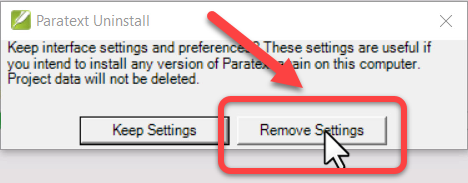
a. 您必須點擊「Remove settings」:
-
解除安裝後:
a. 將 My Paratext 9 Project 資料夾剪下並貼上到新位置。
-
重新安裝時,變更 My Paratext Projects 資料夾的位置:
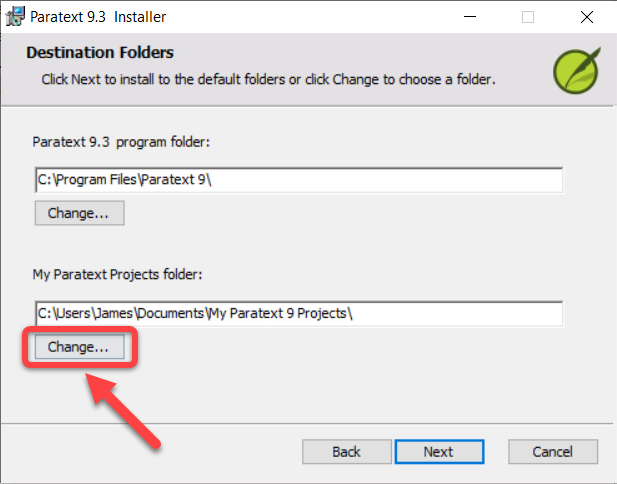
a. 點擊 My Paratext Projects 資料夾下方的 Change 按鈕:
b. 選擇新位置(我們建議使用預設位置,即 C:\My Paratext 9 Projects)。
c. 點擊 OK
- 繼續安裝程序
We recommend installing Paratext in the default location, which is C:\My Paratext 9 Projects.
The best way to do this is to uninstall and reinstall Paratext to make a change to My Paratext Projects folder location.
Here are a couple of key points for doing this:
-
Before uninstalling:
a. Save your current layout (Paratext menu > Save current layout).
-
When uninstalling:
a. You must click “Remove settings”:
-
After uninstalling:
a. Cut and paste the My Paratext 9 Project folder to the new location.
-
When reinstalling, change the My Paratext Projects folder location:
a. Click the Change button under My Paratext Projects folder:
b. Choose the new location (We recommend the default location, which is C:\My Paratext 9 Projects).
c. Click OK
- Continue with the installation
機器翻譯自 English








