我们建议将 Paratext 安装在默认位置,即 C:\My Paratext 9 Projects。
更改 My Paratext Projects 文件夹位置的最佳方法是卸载并重新安装 Paratext。
以下是执行此操作的几个关键点:
-
卸载之前:
a. 保存当前布局(Paratext 菜单 > Save current layout)。
-
卸载时:
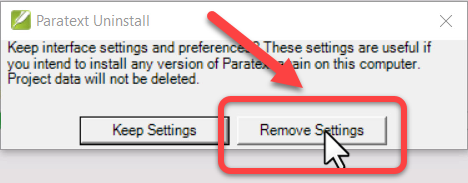
a. 必须点击“Remove settings”:
-
卸载之后:
a. 将 My Paratext 9 Project 文件夹剪切并粘贴到新位置。
-
重新安装时,更改 My Paratext Projects 文件夹位置:
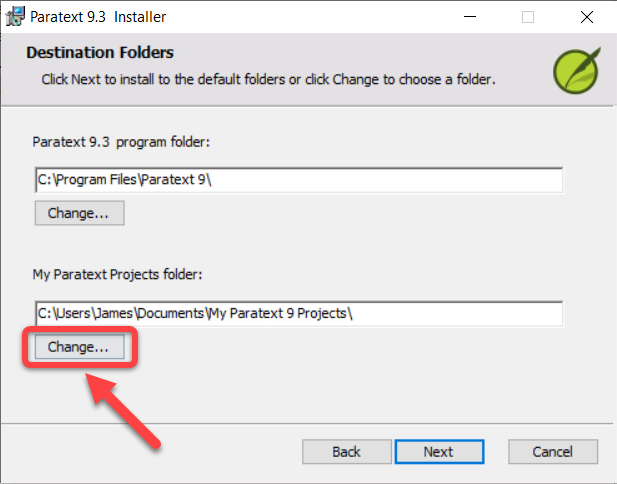
a. 点击 My Paratext Projects 文件夹下方的 Change 按钮:
b. 选择新位置(我们建议默认位置,即 C:\My Paratext 9 Projects)。
c. 点击 OK
- 继续安装
We recommend installing Paratext in the default location, which is C:\My Paratext 9 Projects.
The best way to do this is to uninstall and reinstall Paratext to make a change to My Paratext Projects folder location.
Here are a couple of key points for doing this:
-
Before uninstalling:
a. Save your current layout (Paratext menu > Save current layout).
-
When uninstalling:
a. You must click “Remove settings”:
-
After uninstalling:
a. Cut and paste the My Paratext 9 Project folder to the new location.
-
When reinstalling, change the My Paratext Projects folder location:
a. Click the Change button under My Paratext Projects folder:
b. Choose the new location (We recommend the default location, which is C:\My Paratext 9 Projects).
c. Click OK
- Continue with the installation
机器翻译自 English








