感謝 hindlemail 提供這套有用的說明。我決定自己試試看,但很快發現必須更改幾處,才能讓各種 .bat 檔案和 python 腳本運作(特別是使用 Python 3 時)。我還沒完全搞定……但快成功了!
一切似乎都運作正常,直到我在 Chrome 中開啟 display_glossies.html。然後我看到了這個:
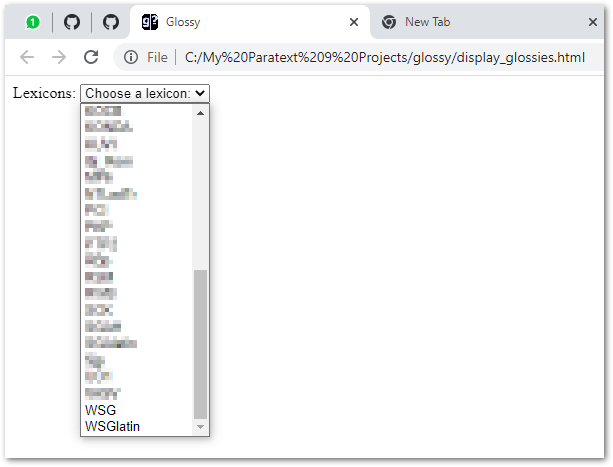
我可以選擇專案,但之後什麼都沒發生。顯然某處缺少了一個環節,但對我來說並不明顯。我的 glossy 資料夾裡填滿了 XYZ_Lexicon.xml 檔案,但沒有一個能顯示出來。
我使用了這個命令來啟動 Chrome 並顯示頁面,希望這樣能使其運作,但仍然沒有反應……
"C:\Program Files (x86)\Google\Chrome\Application\chrome.exe" --allow-file-access-from-files "%CD%\display_glossies.html"
我還能去哪裡挖掘?我的希望是讓它運作起來,然後分享更新後的版本(儘管包含硬編碼路徑等),這樣其他人就不必經歷同樣的痛苦了。
Thanks for this helpful set of instructions hindlemail. I decided to have a go myself, but soon found that several things had to be changed to get the various .bat files and python scripts to work (esp with Python 3). And I’m not there yet… but almost!
Everything seems to work until I open display_glossies.html in Chrome. Then I see this:
I can select a project, but then nothing happens. There’s obviously a piece missing somewhere, but it isn’t obvious to me. My glossy folder is filled with XYZ_Lexicon.xml files, but none of them display.
I used this command to start Chrome and show the page, and hoped that it would make it work, but still nothing…
"C:\Program Files (x86)\Google\Chrome\Application\chrome.exe" --allow-file-access-from-files "%CD%\display_glossies.html"
Where else can I dig? My hope is to get it working and then share the updated version (albeit with hardcoded paths etc.) so that others don’t need to go through the same pain.
機器翻譯自 English








