Olá @anon952029 - Sim, o site da comunidade do PTXprint é monitorado um pouco mais de perto para quaisquer solicitações futuras sobre o PTXprint.
Há alguns lugares que eu verificaria para ver se você tem as configurações certas. (1) A aba Fonts+Scripts. Certifique-se de estar usando a Visão Completa (caso contrário, algumas dessas configurações avançadas nem sequer aparecerão para você).
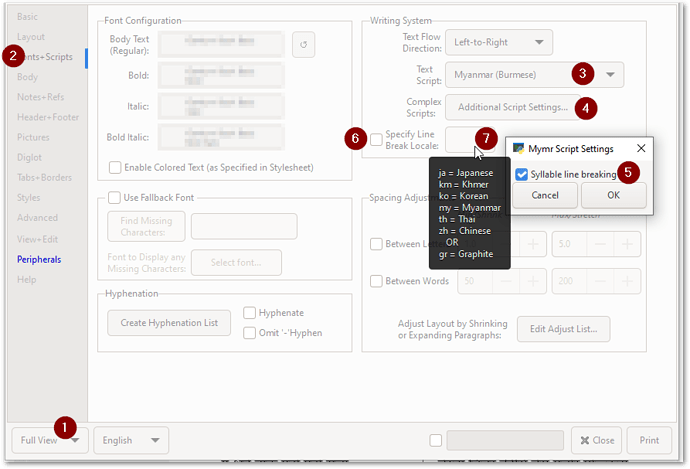
image893×608 45.7 KB
Eu não acho que você precise definir o Local de quebra de linha se estiver usando a Configuração de Script Adicional e tiver "Quebra de linha por sílaba" ativado. Mas tente das duas maneiras para ver que diferença isso faz.
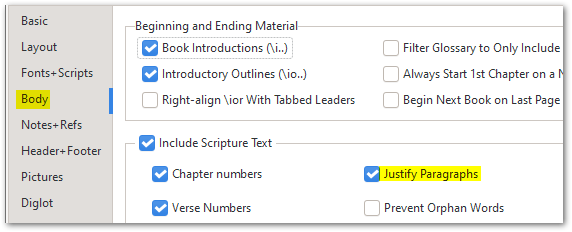
E depois na aba (2) Body, certifique-se de que Justify Paragraphs esteja habilitado:
Depois disso, todas as coisas normais de Estilo se aplicam (como @mnjames já apontou acima).
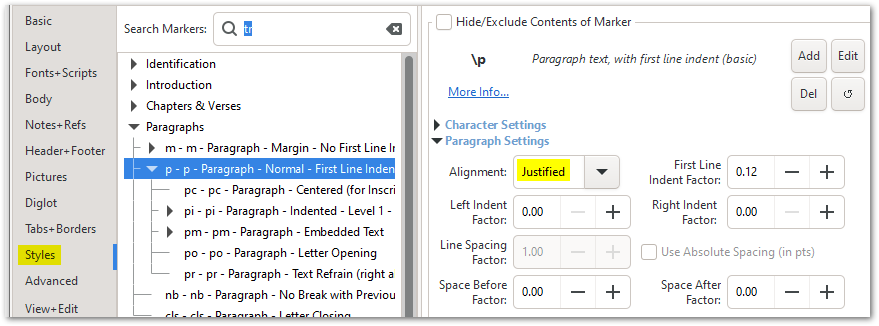
image879×326 27.1 KB
Se você ainda estiver lutando para fazê-lo se comportar como você precisa, então por favor envie um arquivo de arquivo pequeno como explicado na aba Help:
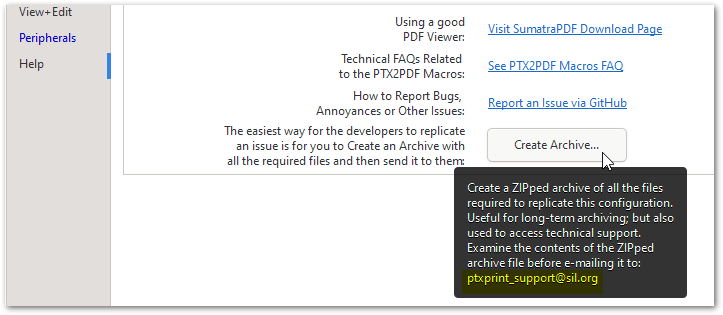
image723×315 19.5 KB
Hi @anon952029 - Yes, the PTXprint community site is monitored a bit more closely for any future requests about PTXprint.
There are a couple of places I would check to see that you’ve got the right settings. (1) The Fonts+Scripts tab. Make sure you are using Full View (otherwise some of these advanced settings won’t even appear for you).
image893×608 45.7 KB
I don’t think you need to set the Line break Locale if you are using the Additional Script Setting and have “Syllable line breaking” turned on. But try it both ways to see what difference it makes.
And then on (2) Body tab, make sure that Justify Paragraphs is enabled:
After that, all the usual Style things apply (as @mnjames has already pointed out above).
image879×326 27.1 KB
If you are still struggling to make it behave as you need it to, then please send a small archive file as explained on the Help tab:
image723×315 19.5 KB








