TSNgaihte 您好,
您有回報這個問題嗎?這絕對是一個需要為所有人修復的錯誤。最好由您來回報,以便開發人員能正確地追蹤並找出問題所在。問題在於 Publishing Assistant 正在對這些 InDesign 字元樣式套用字距(tracking)屬性:v v1 vsp 和 v1sp。我不會感到驚訝,如果它也對 cnum 和 cnumEndSpace 字元樣式套用了字距,但我無法從您的截圖中判斷。當然,在雙語版(diglot)中,您將會有兩組字元樣式,以區分主要和次要文字樣式。因此,它應該類似於 diglot_v 或 v_diglot。您可以將文字工具游標放在該處的文字中,並查看字元樣式面板,該面板會將其高亮顯示,從而加以判斷。
字距在此控制面板中手動控制:
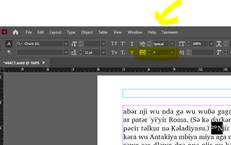
這很有參考價值,但您不希望手動修復這些,您希望強制 InDesign 移除 PA 對我所列出的具有這些字元樣式的所有文字所套用的字距覆蓋(同時不損害其他有益的字距)。我原本有一個更困難的方法告訴您如何執行此操作,但我再次搜尋了如何修復這個問題,並找到了一個更好的解決方案。這是連結:https://www.nobledesktop.com/learn/indesign/fix-style-override 。您需要對上述我列出的每個樣式執行此操作,但我將以 v 字元樣式(您的可能是 v_diglot 樣式)為您逐步說明。

Greetings, TSNgaihte,
Did you report the problem? It definitely is a bug that needs fixing for everyone. It is best if you do so, so that the developer and track it down properly. The problem is that Publishing Assistant is applying a tracking attribute to these InDesign character styles: v v1 vsp and v1sp. I wouldn’t be surprised if it were also applying tracking to the cnum and cnumEndSpace character styles as well, but I can’t tell from your screenshot. Of course, in a diglot, you will have two sets of character styles, in order to differentiate between the primary and secondary text styles. So, it should be something like diglot_v, or v_diglot. You will be able to tell by putting your text tool cursor in the text at that point and looking at the character style panel, which will highlight it.
Tracking is controlled manually with the control panel here:
This is informative, but you don’t want to manually fix these, you want to force InDesign to remove the tracking override that PA applied from all of the text with the character styles I listed (without hurting the tracking on the rest of the text which is beneficial. I had a more difficult way to tell you to do this but just searched AGAIN on how to fix this problem and found a better solution. Here is the link: https://www.nobledesktop.com/learn/indesign/fix-style-override . You will need to do this with every style I listed above, but I’ll walk you through it with the v characters style (yours may be the v_diglot style).
機器翻譯自 English








