Здравствуйте, TSNgaihte,
Вы сообщили об этой проблеме? Это определённо баг, который нужно исправить для всех. Лучше всего сделать это, чтобы разработчик мог должным образом отследить и устранить проблему. Суть в том, что Publishing Assistant применяет атрибут трекинга (tracking) к следующим стилем символов InDesign: v, v1, vsp и v1sp. Я бы не удивился, если бы он также применял трекинг к стилям символов cnum и cnumEndSpace, но по вашему скриншоту я не могу этого сказать. Конечно, в диглоте у вас будет два набора стилей символов, чтобы различать основные и вторичные стили текста. Так что, вероятно, это будет что-то вроде diglot_v или v_diglot. Вы сможете определить это, поместив курсор инструмента текста в текст в нужном месте и посмотрев на панель стилей символов, которая подсветит активный стиль.
Трекинг вручную контролируется на панели управления здесь:
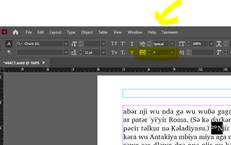
Это информативно, но вам не нужно исправлять это вручную. Вам нужно заставить InDesign удалить переопределение трекинга, применённое PA, ко всему тексту со стилями символов, которые я перечислил (не нарушая при этом трекинг остального текста, который полезен). У меня был более сложный способ объяснить, как это сделать, но я снова поискал, как исправить эту проблему, и нашёл лучшее решение. Вот ссылка: https://www.nobledesktop.com/learn/indesign/fix-style-override . Вам нужно будет сделать это для каждого стиля, перечисленного выше, но я проведу вас через это на примере стиля символов v (у вас может быть стиль v_diglot).

Greetings, TSNgaihte,
Did you report the problem? It definitely is a bug that needs fixing for everyone. It is best if you do so, so that the developer and track it down properly. The problem is that Publishing Assistant is applying a tracking attribute to these InDesign character styles: v v1 vsp and v1sp. I wouldn’t be surprised if it were also applying tracking to the cnum and cnumEndSpace character styles as well, but I can’t tell from your screenshot. Of course, in a diglot, you will have two sets of character styles, in order to differentiate between the primary and secondary text styles. So, it should be something like diglot_v, or v_diglot. You will be able to tell by putting your text tool cursor in the text at that point and looking at the character style panel, which will highlight it.
Tracking is controlled manually with the control panel here:
This is informative, but you don’t want to manually fix these, you want to force InDesign to remove the tracking override that PA applied from all of the text with the character styles I listed (without hurting the tracking on the rest of the text which is beneficial. I had a more difficult way to tell you to do this but just searched AGAIN on how to fix this problem and found a better solution. Here is the link: https://www.nobledesktop.com/learn/indesign/fix-style-override . You will need to do this with every style I listed above, but I’ll walk you through it with the v characters style (yours may be the v_diglot style).








