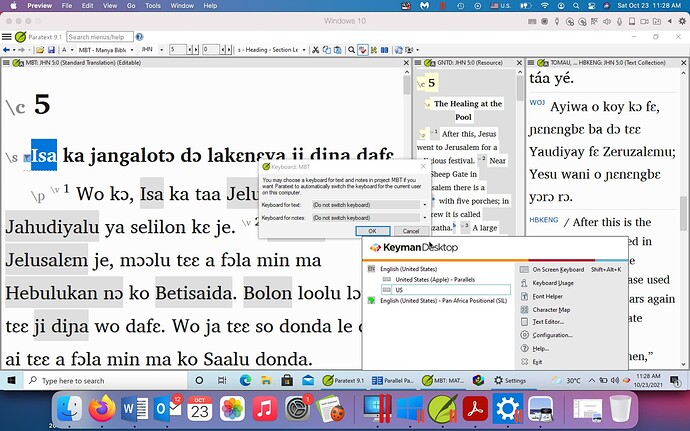
你好,我在 Windows 10(通过 Parallels Desktop 16 运行)上使用 Paratext 9。我正在使用 Keyman 键盘(Pan African Positional (SIL))在项目窗口中输入文本。但每当我点击项目窗口以外的地方时,它都会变回默认的英文键盘。当我进入项目设置中的“Keyboard”时,Keyman 键盘并未列为选项。我也无法在 Windows 语言设置中找到它。任何帮助都将不胜感激!
Screenshot1920×1200 219 KB
Hello, I’m using Paratext 9 in Windows 10 (run by Parallels Desktop 16). I’m using a Keyman keyboard (Pan African Positional (SIL) to input the text in the project window. But any time I click away from the project window, it goes back to the default English keyboard. When I go to “Keyboard” in Project Settings, the Keyman keyboard is not listed as an option. I also can not find it in the Windows language settings. Any help would be appreciated!
Screenshot1920×1200 219 KB
机器翻译自 English








