0 голосов
491 просмотров

When a note is attached to a word that is later deleted, the note loses its footing. In Paratext 9.0.103.1 (and earlier), the note is then reattached to the same word in a different place, which is very confusing. Or if it does not find such a word, the note is attached to the begining of the verse. This is very unhelpful for Introductions and extra books without verse numbers. Are there plans to change this so that a note that loses its footing is attached to either the preceding or following word relative to the word(s) that are deleted? One can reattach a word, but that is not helpful either.

Старое сообщение — показано на исходном языке
Paratext от (869 очков) | 491 просмотров

2 Ответов

0 голосов
Лучший ответ

Best solution is to attach the note to a longer series of words so it can still reattach to the same location. Unfortunately that is not always possible because of markup, and the note itself will not attach to the specific word or phrase in question. In those situations you may need to make clear in the note the exact text that the note refers to.
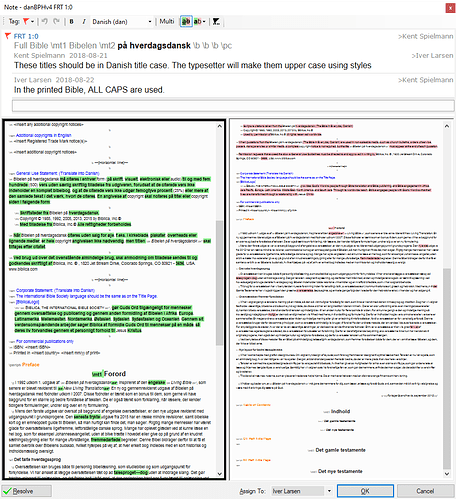
Also, as you may be aware, PT copies the entire verse into the user’s note file when you make the note. This is a very nice feature in Bible text to see the changes made in the verse since the note was created. However it is not so useful in extra books where the entire book (actually chapter) is copied into every single note. Not only is it hard to read the compare versions pane in the note, it also bloats the user’s notes file For that reason I try to avoid putting notes into extra books. I will use remarks \rem and communication outside of PT to minimize the number of notes I make in extra books.

Старое сообщение — показано на исходном языке
от (1,8тыс. очков)
снова показан

Thank you. Most of my notes deal with a single word, so if I attach the note to that word, it is highlighted. In a few cases I select a phrase or a whole sentence. I can try to select two words, but it probably requires me to repeat the word I am referring to in the note. I’ll experiment with it.
What do you mean by the note file? I suppose you are not talking about the xml file in the project folder. Within the note itself, only part of the verse is quoted. I sometimes have to use the project history and from there look at the changes made by a particular user. It just takes a very long time to get to there. I was hoping for a program improvement.

Старое сообщение — показано на исходном языке

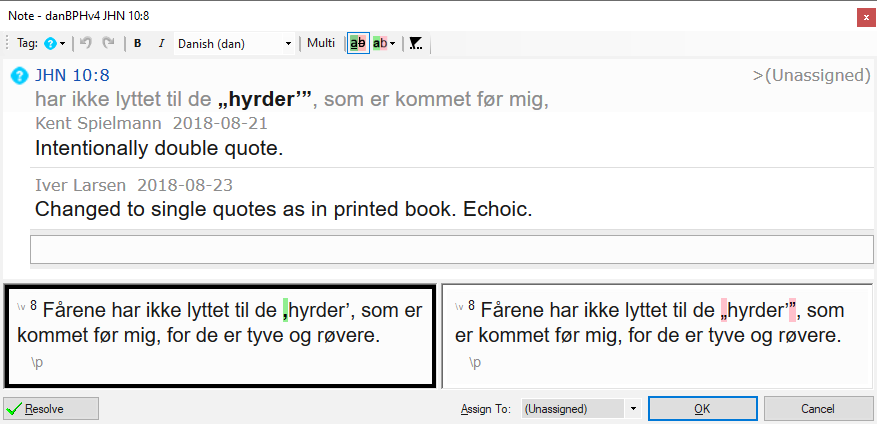
I actually do mean the notes.xml files that Paratext creates for each user who makes noes in the project. Th text fro the entire verse in copied into the note when you create it so that changes can be displayed. Here is an example from Bibelen på hverdagsdansk that show quote marks were changed from double to single quotes:

this is OK for verses, but when a note is created in an extra book, which is usually one chapter, the entire book is copied into the note:
Старое сообщение — показано на исходном языке

Iver+Larsen,

Go to Tools Menu then Notes list. It will ask you to specify which project(s) you want to make a list of all the project notes for, and it will make a list. When you see the note you want to review, click on the blue “open” link in the upper right of the entry and it will expand to see everything.

Старое сообщение — показано на исходном языке
0 голосов

No, there are no plans to change the current behavior.

Старое сообщение — показано на исходном языке
от [Expert]
(16,7тыс. очков)

Похожие вопросы

0 голосов
3 ответов 956 просмотров
Я посмотрел все видео о списке слов и проверке орфографии на https://paratext.org/videos/en/wordlist-spell-check- ... . только те, у которых стоит вопросительный знак)? anon441204
anon441204 250 задал вопрос авг 9, 2021
0 голосов
2 ответов 242 просмотров
Некоторое время назад в версии 7 был настроен проект обратной трансляции с использованием именования KBT ... зарегистрирован, невозможно отредактировать информацию о регистрации.
anon392948 143 задал вопрос фев 25, 2021
0 голосов
7 ответов 986 просмотров
how to get my PTX project Biblical terms list to default from away from major biblical terms and to default to all ... attached) I can send you an attached file if you want.
anon441204 250 задал вопрос июн 12, 2020
0 голосов
6 ответов 1,3тыс. просмотров
Я несколько раз замечал(а) в нескольких разных проектах, что моя заметка не прикрепляется к слову, которое я выбрал( ... и отвечать. Кто-нибудь ещё сталкивался с этой проблемой?
nomadic consultant 169 задал вопрос сен 14, 2020
0 голосов
2 ответов 145 просмотров
В нашей команде есть как минимум 16 проектов Paratext. Нам нужно знать количество неразрешённых заметок с меткой ... вопросе. Джон Нистром Программа перевода Aitape West SIL PNG
john_nystrom 312 задал вопрос июн 8
Welcome to Support Bible, where you can ask questions and receive answers from other members of the community.
Just as a body, though one, has many parts, but all its many parts form one body, so it is with Christ.
1 Corinthians 12:12
3,051 вопросов
6,010 ответов
5,676 комментариев
2,030 пользователей






