看起來您將藍色套用到了幾個樣式上。請在「樣式」(Styles)標籤頁中搜尋這些標記,並將顏色更改為適當的顏色。
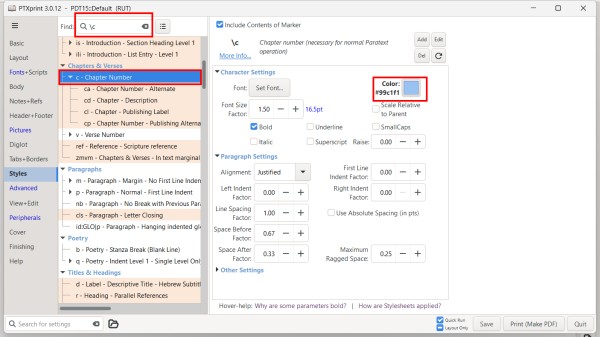
如果專案資料夾中有一個包含大量顏色設定的 custom.sty 檔案,您可以嘗試將該檔案重新命名為 custom.styold 之類的名稱,這樣 PTXprint 就不會使用它。
您也可以在「進階」(Advanced)標籤頁中開啟或關閉 custom.sty 檔案。您也可以從那裡編輯該檔案,透過在不想套用的任何行開頭加上 # 來註解掉顏色設定。
It looks like you have applied blue to a couple of styles. Search for those markers in the Styles tab and change the color to the appropriate color.
If there is a custom.sty file in the project folder with lots of color set, you might try renaming that file to something like custom.styold so that PTXprint will not use it.
You can also turn on and off the custom.sty file on the Advanced tab. You can also edit the file from there to comment out colors but placing a # at the beginning of any line you don't want to apply.
機器翻譯自 English








