Il semble que vous ayez appliqué la couleur bleue à quelques styles. Recherchez ces marqueurs dans l'onglet Styles et changez la couleur en la couleur appropriée.
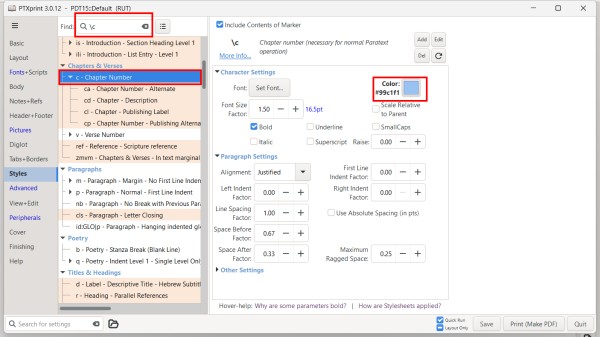
S'il y a un fichier custom.sty dans le dossier du projet avec beaucoup de couleurs définies, vous pouvez essayer de renommer ce fichier en quelque chose comme custom.styold afin que PTXprint ne l'utilise pas.
Vous pouvez également activer et désactiver le fichier custom.sty sur l'onglet Avancé. Vous pouvez également modifier le fichier depuis là pour commenter les couleurs en plaçant un # au début de toute ligne que vous ne souhaitez pas appliquer.
It looks like you have applied blue to a couple of styles. Search for those markers in the Styles tab and change the color to the appropriate color.
If there is a custom.sty file in the project folder with lots of color set, you might try renaming that file to something like custom.styold so that PTXprint will not use it.
You can also turn on and off the custom.sty file on the Advanced tab. You can also edit the file from there to comment out colors but placing a # at the beginning of any line you don't want to apply.
Traduit automatiquement depuis English








