Sepertinya Anda telah menerapkan warna biru pada beberapa gaya. Cari penanda tersebut di tab Styles dan ubah warnanya menjadi warna yang sesuai.
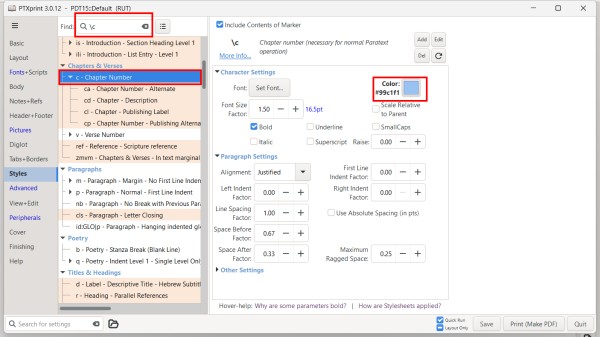
Jika ada file custom.sty di folder proyek dengan banyak pengaturan warna, Anda bisa mencoba mengganti nama file tersebut menjadi sesuatu seperti custom.styold agar PTXprint tidak menggunakannya.
Anda juga dapat mengaktifkan dan menonaktifkan file custom.sty di tab Advanced. Anda juga dapat mengedit file dari sana untuk mengomentari warna dengan menempatkan # di awal baris mana pun yang tidak ingin Anda terapkan.
It looks like you have applied blue to a couple of styles. Search for those markers in the Styles tab and change the color to the appropriate color.
If there is a custom.sty file in the project folder with lots of color set, you might try renaming that file to something like custom.styold so that PTXprint will not use it.
You can also turn on and off the custom.sty file on the Advanced tab. You can also edit the file from there to comment out colors but placing a # at the beginning of any line you don't want to apply.
Diterjemahkan secara otomatis dari English








