看起来您已将蓝色应用于几个样式。请在“样式”(Styles)选项卡中搜索这些标记,并将颜色更改为适当的颜色。
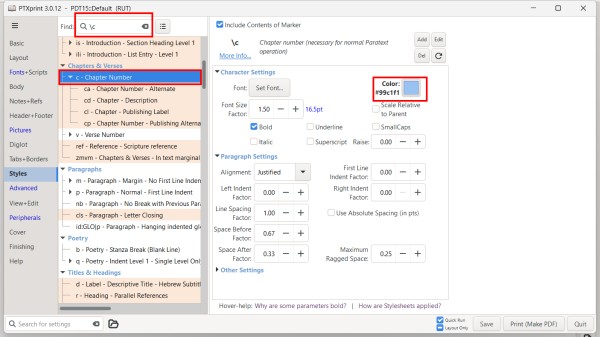
如果项目文件夹中有一个包含大量颜色设置的 custom.sty 文件,您可以尝试将该文件重命名为类似 custom.styold 的名称,这样 PTXprint 就不会使用它。
您还可以在“高级”(Advanced)选项卡中打开或关闭 custom.sty 文件。您也可以从那里编辑该文件,通过在不想应用的行首添加 # 来注释掉颜色。
It looks like you have applied blue to a couple of styles. Search for those markers in the Styles tab and change the color to the appropriate color.
If there is a custom.sty file in the project folder with lots of color set, you might try renaming that file to something like custom.styold so that PTXprint will not use it.
You can also turn on and off the custom.sty file on the Advanced tab. You can also edit the file from there to comment out colors but placing a # at the beginning of any line you don't want to apply.
机器翻译自 English








