Похоже, что вы применили синий цвет к нескольким стилям. Найдите эти маркеры на вкладке Styles и измените цвет на подходящий.
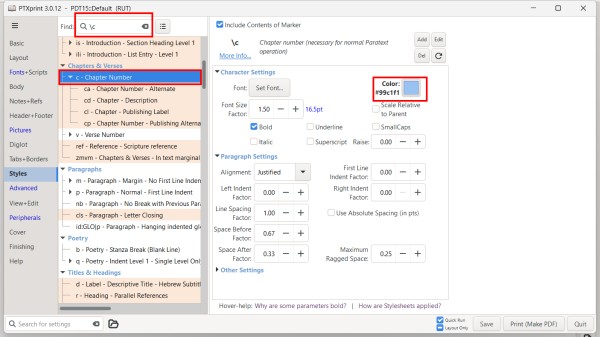
Если в папке проекта есть файл custom.sty с множеством заданных цветов, вы можете попробовать переименовать этот файл, например, в custom.styold, чтобы PTXprint не использовал его.
Вы также можете включать и отключать файл custom.sty на вкладке Advanced. Оттуда же можно отредактировать файл, закомментировав цвета, поставив # в начале любой строки, которую вы не хотите применять.
It looks like you have applied blue to a couple of styles. Search for those markers in the Styles tab and change the color to the appropriate color.
If there is a custom.sty file in the project folder with lots of color set, you might try renaming that file to something like custom.styold so that PTXprint will not use it.
You can also turn on and off the custom.sty file on the Advanced tab. You can also edit the file from there to comment out colors but placing a # at the beginning of any line you don't want to apply.








