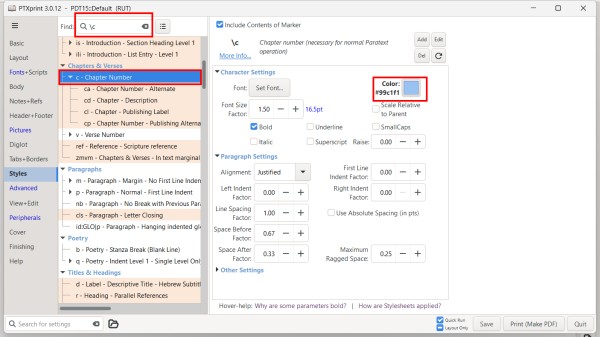
Parece que ha aplicado el color azul a un par de estilos. Busque esos marcadores en la pestaña Styles y cambie el color al color apropiado.
Si hay un archivo custom.sty en la carpeta del proyecto con muchos colores establecidos, podría intentar renombrar ese archivo a algo como custom.styold para que PTXprint no lo use.
También puede activar y desactivar el archivo custom.sty en la pestaña Advanced. También puede editar el archivo desde allí para comentar los colores colocando un # al principio de cualquier línea que no desee aplicar.
It looks like you have applied blue to a couple of styles. Search for those markers in the Styles tab and change the color to the appropriate color.
If there is a custom.sty file in the project folder with lots of color set, you might try renaming that file to something like custom.styold so that PTXprint will not use it.
You can also turn on and off the custom.sty file on the Advanced tab. You can also edit the file from there to comment out colors but placing a # at the beginning of any line you don't want to apply.
Traducción automática desde English








