推測 Noto Nastaliq Urdu 字體不包含任何基本拉丁字符——這就是為什麼會出現豆腐塊。有兩種可能的解決方案:
1. 切換到*確實*包含基本拉丁字符的 Nastaliq 字體,例如: software.sil.org/awami/
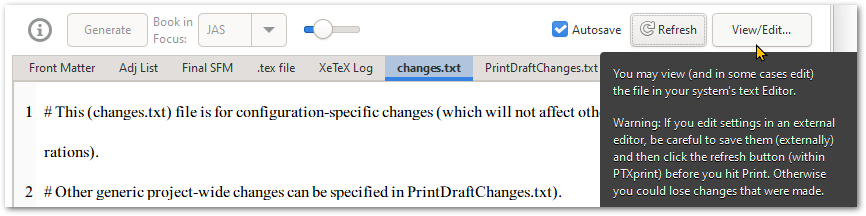
2. 點擊右上角的 View/Edit... 按鈕,在您的預設文字編輯器中編輯 changes.txt 檔案(強烈推薦使用 Notepad++),但完成後,請導航到另一個標籤頁(例如 XeTeX Log 標籤頁),這樣當自動儲存(Autosave)啟動時,就不會不斷覆蓋您在外部所做的更改。[另一個更麻煩的選項是停留在 changes.txt 上,但在 PTXprint 外部更新檔案後點擊 "Refresh" 按鈕。]
Presumably the Noto Nastaliq Urdu font doesn't contain any of the basic latin glyphs - hence the tofu boxes. There are two possible solutions:
1. Switch to a Nastaliq font which *does* have Basic latin, for example: software.sil.org/awami/
2. Click on the View/Edit... button at the top right, to edit the changes.txt file in your default text editor (Notepad++ is highly recommended), but after doing so, navigate to a different tab (for example to the XeTeX Log tab) so that when Autosave kicks in, it doesn't keep wiping out the changes you made externally. [The other more painful option is to leave it on changes.txt but click the "Refresh" button after you have updated the file outside of PTXprint.]
機器翻譯自 English








