संभवतः Noto Nastaliq Urdu फ़ॉन्ट में कोई भी मूल लैटिन ग्लिफ़ नहीं होते हैं - इसलिए tofu बॉक्स दिख रहे हैं। दो संभावित समाधान हैं:
1. Nastaliq फ़ॉन्ट में बदलें जिसमें *वास्तव में* Basic latin हो, उदाहरण के लिए: software.sil.org/awami/
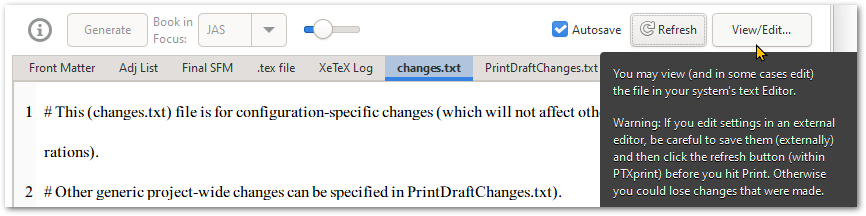
2. changes.txt फ़ाइल को अपने डिफ़ॉल्ट टेक्स्ट एडिटर में संपादित करने के लिए ऊपर दाईं ओर View/Edit... बटन पर क्लिक करें (Notepad++ की अत्यधिक सिफ़ारिश की जाती है), लेकिन ऐसा करने के बाद, एक अलग टैब पर जाएं (उदाहरण के लिए XeTeX Log टैब पर) ताकि जब Autosave सक्रिय हो, तो यह आपके बाह्य रूप से किए गए परिवर्तनों को बार-बार मिटाता न रहे। [दूसरा अधिक कष्टदायक विकल्प changes.txt पर रहना है, लेकिन PTXprint के बाहर फ़ाइल को अपडेट करने के बाद "Refresh" बटन पर क्लिक करना है।]
Presumably the Noto Nastaliq Urdu font doesn't contain any of the basic latin glyphs - hence the tofu boxes. There are two possible solutions:
1. Switch to a Nastaliq font which *does* have Basic latin, for example: software.sil.org/awami/
2. Click on the View/Edit... button at the top right, to edit the changes.txt file in your default text editor (Notepad++ is highly recommended), but after doing so, navigate to a different tab (for example to the XeTeX Log tab) so that when Autosave kicks in, it doesn't keep wiping out the changes you made externally. [The other more painful option is to leave it on changes.txt but click the "Refresh" button after you have updated the file outside of PTXprint.]
English से मशीन-अनुवादित








