आप वर्डलिस्ट खोल सकते हैं और उस पुस्तक या पुस्तकों के लिए पुस्तक फ़िल्टर चुन सकते हैं जिनकी गणना करना चाहते हैं। यदि आप प्राथमिकता (priority) का उपयोग करते हैं, तो आप किसी विशेष अध्याय या अध्यायों तक सीमित कर सकते हैं। रेंज (range) के साथ आप विशिष्ट श्लोक चुन सकते हैं।
फिर मेनू > export to xml का उपयोग करके सूची को एक xml फ़ाइल में निर्यात करें।
उस फ़ाइल को Excel में खोलें और Excel को एक xml टेबल बनाने की अनुमति दें। इससे डेटा कॉलम में आ जाएगा (जिनमें से एक Count है)।
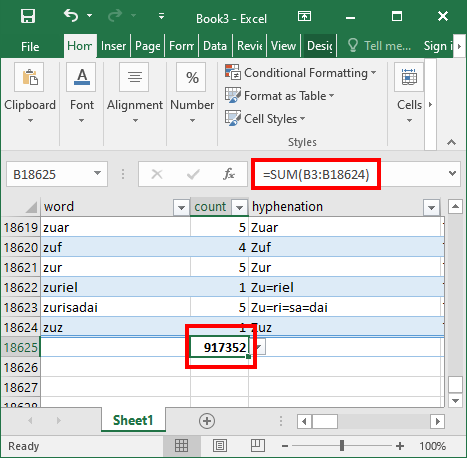
चुने गए पाठ में सभी शब्दों का योग बनाने के लिए =sum(xx:yy) का उपयोग करें।
You can open the wordlist and select the book filter for the book or books that you want to count. If you use a priority you should be able to select down to a particular chapter or chapters. With the range you can select specific verses.
Then export the list to an xml file using the menu > export to xml
Open that file in Excel and allow Excel to create an xml table. This will put the data into columns (one of which is Count)
Use =sum(xx:yy) to generate a sum of all the words in the selected text.
English से मशीन-अनुवादित








