Puede abrir la lista de palabras y seleccionar el filtro de libro para el libro o los libros que desee contar. Si utiliza una prioridad, debería poder seleccionar hasta un capítulo o capítulos específicos. Con el rango, puede seleccionar versículos específicos.
Luego, exporte la lista a un archivo xml usando el menú > export to xml
Abra ese archivo en Excel y permita que Excel cree una tabla xml. Esto colocará los datos en columnas (una de las cuales es Count)
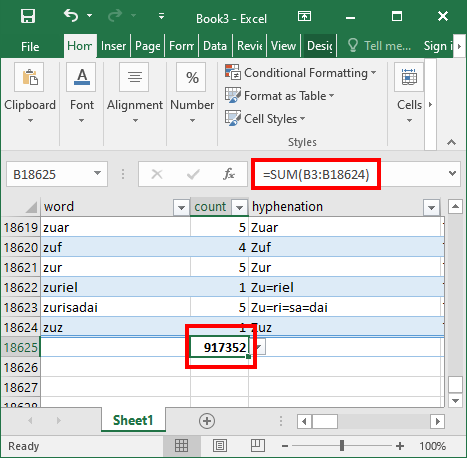
Use =sum(xx:yy) para generar la suma de todas las palabras en el texto seleccionado.
You can open the wordlist and select the book filter for the book or books that you want to count. If you use a priority you should be able to select down to a particular chapter or chapters. With the range you can select specific verses.
Then export the list to an xml file using the menu > export to xml
Open that file in Excel and allow Excel to create an xml table. This will put the data into columns (one of which is Count)
Use =sum(xx:yy) to generate a sum of all the words in the selected text.
Traducción automática desde English








