Ótima sugestão, @mjames! No entanto, decidi que uma solução mais elegante era necessária e acabei de implementá-la para lançamento na próxima versão.
Observe que não há mais o botão Criar PDF “Diff”, portanto, não há necessidade de usar Ctrl+D para imprimir um Diff; basta usar Ctrl+P como de costume, e, se a opção estiver habilitada, você obterá o processamento do Diff. [Mas o atalho Ctrl+D apenas alterna essa configuração para você.]
Isso também ajuda a simplificar um pouco a Basic View:
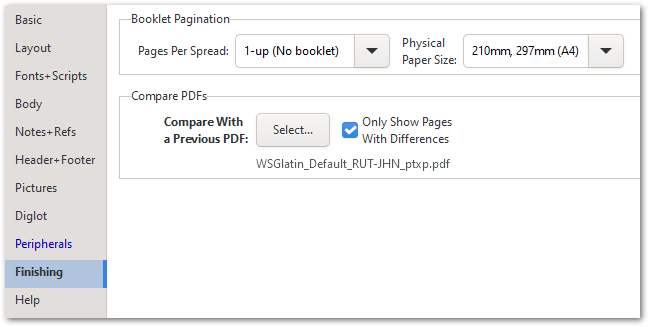
No geral, acredito que isso seja mais intuitivo do que a maneira antiga de fazer as coisas.
Nice suggestion, @mjames! However, I decided that a more elegant solution was called for, and have just implemented that for release in the next version.
Notice that there is no Create “Diff” PDF button any more, so there is no need to use Ctrl+D to print a Diff; just use Ctrl+P as usual, and if the option is enabled, you’ll get the Diff processing. [But the Ctrl+D shortcut will just toggle that setting for you.]
This also helps to simplify the Basic View slightly:
Overall, I trust that this is more intuitive than the old way of doing things.
Tradução automática de English








