0 votes

Is there a reason why ctrl-d prints a Diff pdf on the Finishing tab, but not from elsewhere?

If not, I’d like to request that as a new feature.

The reason: I’d like to make a change, say to a style, and test it immediately without navigating anywhere else (and then needing to navigate back if I don’t like the change).

PTXprint by (1.9k points)

1 Answer

0 votes

Nice suggestion, @mjames! However, I decided that a more elegant solution was called for, and have just implemented that for release in the next version.

Notice that there is no Create “Diff” PDF button any more, so there is no need to use Ctrl+D to print a Diff; just use Ctrl+P as usual, and if the option is enabled, you’ll get the Diff processing. [But the Ctrl+D shortcut will just toggle that setting for you.]

This also helps to simplify the Basic View slightly:
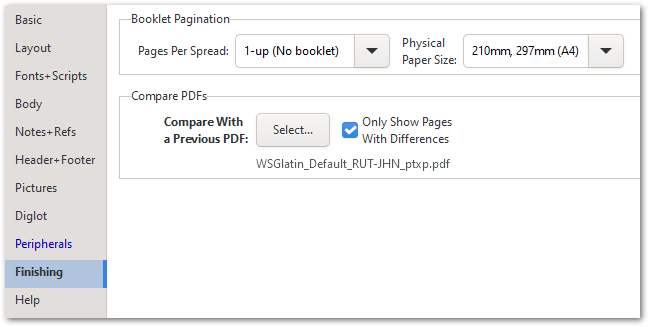
image

Overall, I trust that this is more intuitive than the old way of doing things.

by (3.2k points)
reshown

This is wonderful! Thanks for the amazingly fast implementation.

Welcome to Support Bible, where you can ask questions and receive answers from other members of the community.
Every day they continued to meet together in the temple courts. They broke bread in their homes and ate together with glad and sincere hearts, praising God and enjoying the favor of all the people. And the Lord added to their number daily those who were being saved.
Acts 2:46-47
3,034 questions
5,988 answers
5,659 comments
2,020 users






