為了方便查閱,我在此為有相同疑問的其他使用者做個摘要。
聖經術語譯法(Biblical Terms Renderings)工具旨在於逐節翻譯時,用來複核當前節經文中的關鍵術語。預設情況下,它僅顯示當前節的術語清單,並以面板形式開啟。
聖經術語(Biblical Terms)工具旨在進行全面的聖經術語檢查。上方面板顯示術語清單,中間面板顯示所選術語的條目資訊,下方面板則顯示該術語出現的所有經節。預設情況下,它以浮動視窗形式開啟。
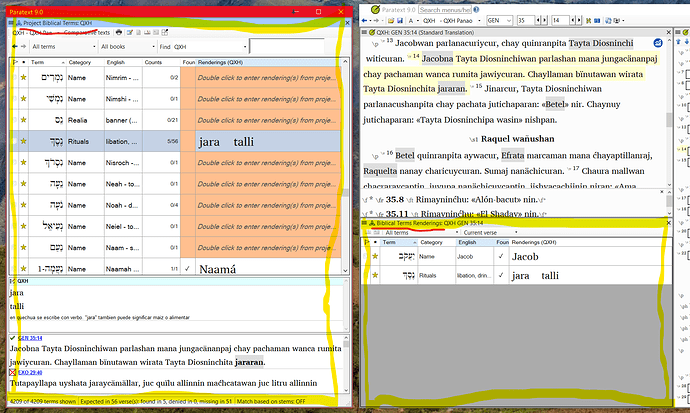
image1817×1088 384 KB
For ease of reference I will summarize here, for anyone else who has the same question.
The Biblical Terms Renderings tool is intended to be used to double-check key terms in the current verse, as one is working verse-by-verse. Only one pane with a list of terms is visible. By default it only shows the terms for the current verse, and it opens as a panel.
The Biblical Terms tool is intended for comprehensive Biblical terms checks. It shows the list of terms in the top panel. The middle panel shows the entry information for the term selected. The bottom panel shows the all of the verses where the selected term appears. By default it opens as a floating window.
image1817×1088 384 KB
機器翻譯自 English








