为了方便查阅,我在这里总结一下,供有同样疑问的各位参考。
Biblical Terms Renderings(圣经术语译法)工具旨在用于逐节工作时,对当前节中的关键术语进行双重检查。默认情况下,它仅显示当前节的术语,并作为面板打开,只显示一个包含术语列表的面板。
Biblical Terms(圣经术语)工具旨在用于全面的圣经术语检查。顶部面板显示术语列表。中间面板显示所选术语的条目信息。底部面板显示所选术语出现的所有经文。默认情况下,它作为浮动窗口打开。
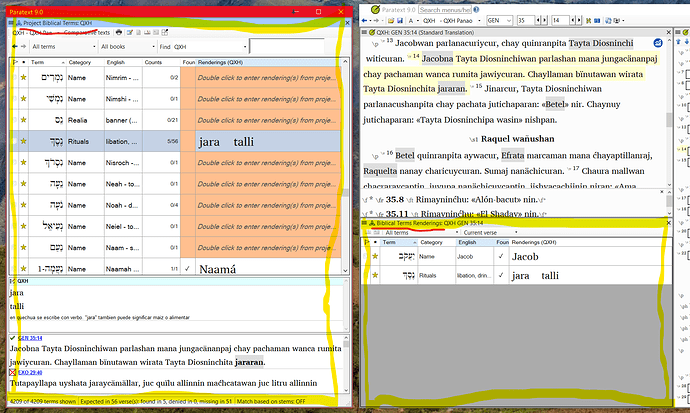
image1817×1088 384 KB
For ease of reference I will summarize here, for anyone else who has the same question.
The Biblical Terms Renderings tool is intended to be used to double-check key terms in the current verse, as one is working verse-by-verse. Only one pane with a list of terms is visible. By default it only shows the terms for the current verse, and it opens as a panel.
The Biblical Terms tool is intended for comprehensive Biblical terms checks. It shows the list of terms in the top panel. The middle panel shows the entry information for the term selected. The bottom panel shows the all of the verses where the selected term appears. By default it opens as a floating window.
image1817×1088 384 KB
机器翻译自 English








