在开始之前,我们要说明,目前向项目添加术语的过程并不简单。我们正在重新设计该工具。
引用:是否有可能项目圣经术语列表尚未生成?
是的,最有可能的是,该项目的“associated”(关联)圣经术语列表是“Project Biblical Terms”列表,而且它目前可能还没有任何术语:

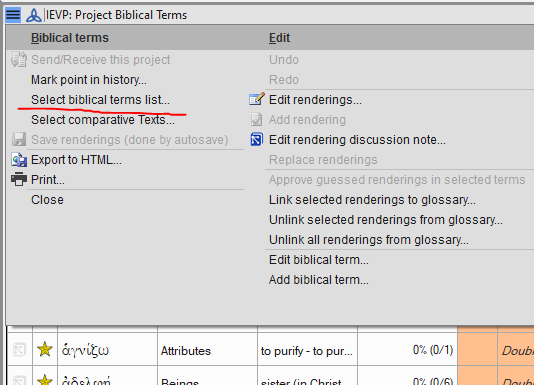
默认情况下,“Project Biblical Terms”列表是空的,等待你添加项目关注的术语。要添加术语到该列表,首先需要在“Biblical Terms”(圣经术语)工具中选择一个列表(该列表已包含术语):
假设你从选项列表中选择了“Major Biblical Terms”(主要圣经术语),现在你正在查看该列表。你可以从该列表中“star”(标记)术语(在工具的第 2 列中,点击或按住 Shift 键点击星号)。或者,如果你想要使用正在查看的列表中的所有术语,可以从菜单中选择“Copy all terms to the XYZ project …”(将所有术语复制到 XYZ 项目……)。这是添加所有术语的最快方法(见下文):
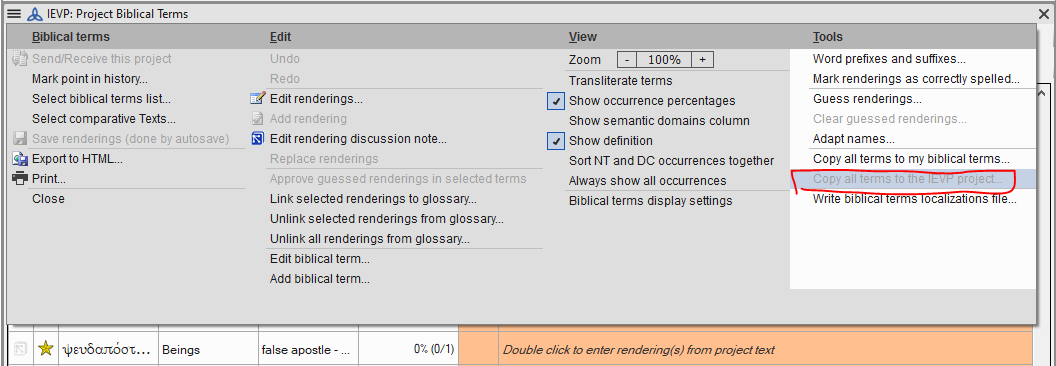
image1056×366 28.5 KB
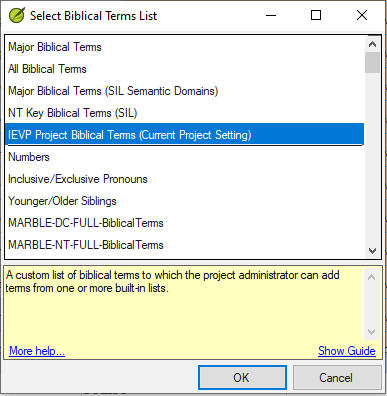
你需要再次使用 Select biblical terms list...(选择圣经术语列表...),并从列表第一部分的底部选择“XYZ project biblical terms”(XYZ 项目圣经术语),以便返回查看和使用你的项目列表:
现在,“Biblical Terms Renderings”(圣经术语译法)窗口不应该变灰,它应该显示所有新添加的术语。
你也可以从其他列表添加其他术语,或移除术语。可以将“Project Biblical Terms”列表视为一个虚拟列表,它显示来自其他“真实”列表的术语。
Paratext 中有很多关于圣经术语的帮助主题。你可以从“Introduction to the Biblical Terms tool”(圣经术语工具简介)开始。paratext.org 也有很多视频。标题为“Project Biblical Terms List: The Basics”(项目圣经术语列表:基础)的视频应该会有帮助。
Before I get started, we’re aware that it is not currently a simple process to add terms to a project. We’re in the process of redesigning the tool.
Blockquote Is it possible that the project Biblical terms list has not be generated.
Yes, it is most likely that your “associated” Biblical Terms list for this project is the Project Biblical Terms list and it probably doesn’t have any terms in it yet:
By default, the Project Biblical Terms list is empty, ready for you to add the terms your project cares about. Terms are added to that list by first selecting a list (which already has terms in it) in the Biblical Terms tool:
Let’s say you chose “Major Biblical Terms” from the list of options and you’re now looking at that list. You can either “star” terms from that list (in column 2 of the tool, click or shift-click on the stars). Or, from the menu choose “Copy all terms to the XYZ project …” if you want to use all of the terms from a list you’re viewing. That’s the quickest way to add them all (see below):
image1056×366 28.5 KB
You’ll need to use Select biblical terms list... again and choose “XYZ project biblical terms” from the bottom of the first section of the list in order to go back to viewing and using your Project list:
Now the Biblical Terms Renderings window shouldn’t look grey, it should show all the newly added terms.
You could also add other terms from another list, or remove terms. Think of the Project Biblical Terms list as a virtual list which displays terms from other “real” lists.
There are many Help topics in Paratext about Biblical Terms. You could start with, “Introduction to the Biblical Terms tool”. paratext.org has many videos too. The one titled “Project Biblical Terms List: The Basics” should be helpful.
机器翻译自 English








