0 votes
448 views

I’m going through the training for using the Biblical terms renderings window part of the window is greyed out and I can’t do anything with it. Anybody any ideas?

Paratext by (136 points)
reshown | 448 views

3 Answers

0 votes
Best answer

There could be a number of reasons.
My first guess is that you haven’t been given permissions to edit renderings. You can look under Project Menu> Project Settings> User Permissions> Other Permissions. There are 2 relevant permissions. I believe that the ‘Terms’ permission refers to editing which terms are part of the project terms list, and ‘Renderings’ refers to entering an approved rendering for that given term. Check to see if you have these permissions for the project you’re working on.

by (1.3k points)

I am the project manager so I do have permission for terms and renderings.

0 votes

If I select a list like major Biblical terms, or NT key Biblical terms then I have items show up the the key terms and renderings window. But when I select project Biblical terms the window is greyed out. Is it possible that the project Biblical terms list has not be generated.

by (136 points)

You could quickly create just one project list entry and see if the selector no longer greys out: Just work from any other list and pick an obvious term and click the star on the left.

No idea what might happen if you select that new list and would then remove your only lonely test-entry. To be safe, maybe create a few real entries. Sounds like you are interested to work with a project list anyway.

hth

The Project Biblical Terms list for every project doesn’t include anything by default. You will have to add terms to the Project Biblical Terms list for it to show anything.

Before I get started, we’re aware that it is not currently a simple process to add terms to a project. We’re in the process of redesigning the tool.

Blockquote Is it possible that the project Biblical terms list has not be generated.

Yes, it is most likely that your “associated” Biblical Terms list for this project is the Project Biblical Terms list and it probably doesn’t have any terms in it yet:

image

By default, the Project Biblical Terms list is empty, ready for you to add the terms your project cares about. Terms are added to that list by first selecting a list (which already has terms in it) in the Biblical Terms tool:
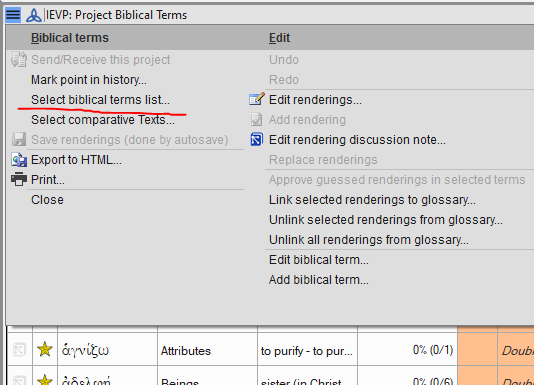
image

Let’s say you chose “Major Biblical Terms” from the list of options and you’re now looking at that list. You can either “star” terms from that list (in column 2 of the tool, click or shift-click on the stars). Or, from the menu choose “Copy all terms to the XYZ project …” if you want to use all of the terms from a list you’re viewing. That’s the quickest way to add them all (see below):
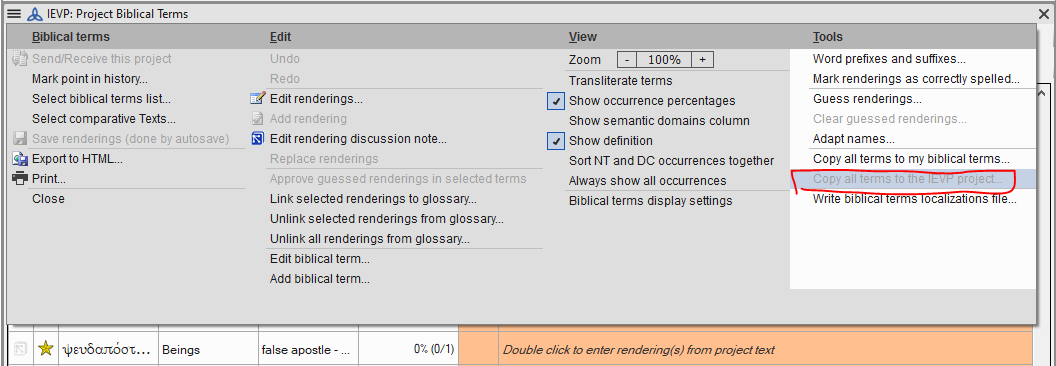
You’ll need to use Select biblical terms list... again and choose “XYZ project biblical terms” from the bottom of the first section of the list in order to go back to viewing and using your Project list:
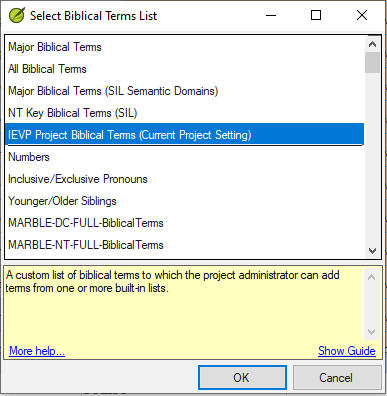
image

Now the Biblical Terms Renderings window shouldn’t look grey, it should show all the newly added terms.

You could also add other terms from another list, or remove terms. Think of the Project Biblical Terms list as a virtual list which displays terms from other “real” lists.

There are many Help topics in Paratext about Biblical Terms. You could start with, “Introduction to the Biblical Terms tool”. paratext.org has many videos too. The one titled “Project Biblical Terms List: The Basics” should be helpful.


0 votes

Got, it. thanks. Sorted.

by (136 points)

Related questions

0 votes
1 answer 249 views
Hi all I tried today to lookup a Logos resource from PT, and found that it had disappeared from the source language ... SR-1 Windows 10 Pro [Phone Removed] Thanks all, anon913937
anon913937 124 asked Oct 29, 2021
0 votes
1 answer 200 views
We have a translation workshop happening right now (for the first time in 7 months since COVID interrupted our schedule), and ... send/receives. We can't figure it out. Any ideas?
Ben Pehrson 280 asked Oct 27, 2020
0 votes
1 answer 273 views
Very recently, the right-click Find in Dictionary' command has appeared greyed out. When I go Project > Project Properties and ... noticed this issue? I'm using PT 7.5.100.87.
Paul 639 asked Oct 11, 2018
0 votes
4 answers 496 views
How do I increase (or change) the font size in the focus text in the Biblical Terms text window? Control-+ doesn' ... column GNTUK in screen capture): Pasted image1916 306 21.7 KB
anon645204 157 asked Feb 3, 2017
0 votes
2 answers 602 views
(john_nystrom writes) How can I share with my teammates work I have done marking Biblical Terms renderings in resource texts ... way we can share a resource text via send/receive.
anonymous asked Apr 10, 2015
Welcome to Support Bible, where you can ask questions and receive answers from other members of the community.
And let us consider how we may spur one another on toward love and good deeds, not giving up meeting together, as some are in the habit of doing, but encouraging one another—and all the more as you see the Day approaching.
Hebrews 10:24-25
3,037 questions
5,994 answers
5,661 comments
2,022 users





