Sebelum saya memulai, kami menyadari bahwa saat ini proses untuk menambahkan istilah ke proyek tidak sederhana. Kami sedang dalam proses merancang ulang alat tersebut.
Blockquote Apakah mungkin daftar istilah Alkitab proyek belum dibuat (generated)?
Ya, sangat mungkin bahwa daftar Istilah Alkitab “terkait” (associated) Anda untuk proyek ini adalah daftar Istilah Alkitab Proyek dan kemungkinan besar belum ada istilah di dalamnya:

Secara default, daftar Istilah Alkitab Proyek kosong, siap untuk Anda menambahkan istilah yang diperhatikan oleh proyek Anda. Istilah ditambahkan ke daftar tersebut dengan pertama-tama memilih daftar (yang sudah memiliki istilah di dalamnya) di alat Istilah Alkitab (Biblical Terms):
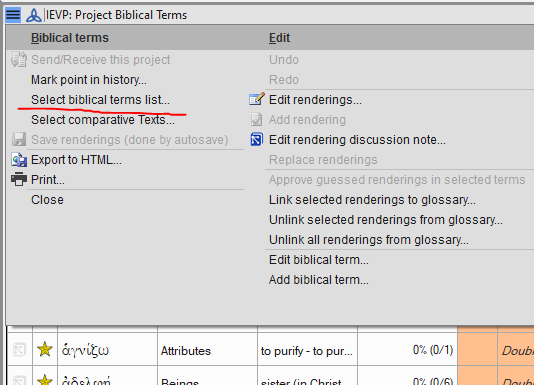
Katakanlah Anda memilih “Istilah Alkitab Utama (Major Biblical Terms)” dari daftar opsi dan Anda sekarang melihat daftar tersebut. Anda bisa “membintangi” istilah dari daftar tersebut (di kolom 2 alat, klik atau shift-klik pada bintang). Atau, dari menu pilih “Salin semua istilah ke proyek XYZ …” jika Anda ingin menggunakan semua istilah dari daftar yang sedang Anda lihat. Itu adalah cara tercepat untuk menambahkan semuanya (lihat di bawah):
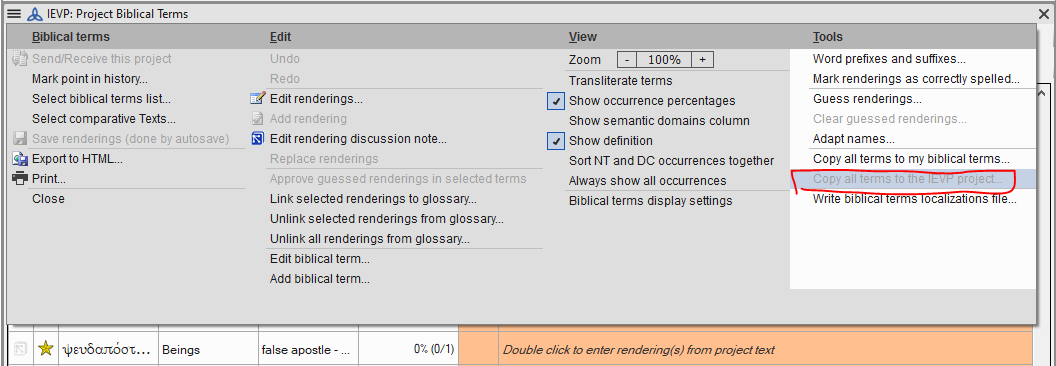
image1056×366 28.5 KB
Anda perlu menggunakan Select biblical terms list... lagi dan memilih “istilah alkitab proyek XYZ” dari bagian bawah bagian pertama daftar untuk kembali ke tampilan dan penggunaan daftar Proyek Anda:
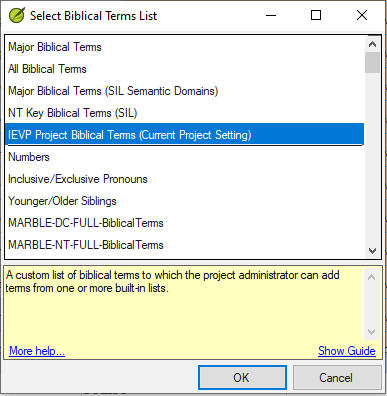
Sekarang jendela Istilah Alkitab Terjemahan (Biblical Terms Renderings) seharusnya tidak terlihat abu-abu, seharusnya menampilkan semua istilah yang baru ditambahkan.
Anda juga bisa menambahkan istilah lain dari daftar lain, atau menghapus istilah. Anggaplah daftar Istilah Alkitab Proyek sebagai daftar virtual yang menampilkan istilah dari daftar “nyata” lainnya.
Ada banyak topik Bantuan di Paratext tentang Istilah Alkitab. Anda bisa memulai dengan, “Pengenalan alat Istilah Alkitab (Biblical Terms tool)”. paratext.org juga memiliki banyak video. Yang berjudul “Daftar Istilah Alkitab Proyek: Dasar-dasar” seharusnya membantu.
Before I get started, we’re aware that it is not currently a simple process to add terms to a project. We’re in the process of redesigning the tool.
Blockquote Is it possible that the project Biblical terms list has not be generated.
Yes, it is most likely that your “associated” Biblical Terms list for this project is the Project Biblical Terms list and it probably doesn’t have any terms in it yet:
By default, the Project Biblical Terms list is empty, ready for you to add the terms your project cares about. Terms are added to that list by first selecting a list (which already has terms in it) in the Biblical Terms tool:
Let’s say you chose “Major Biblical Terms” from the list of options and you’re now looking at that list. You can either “star” terms from that list (in column 2 of the tool, click or shift-click on the stars). Or, from the menu choose “Copy all terms to the XYZ project …” if you want to use all of the terms from a list you’re viewing. That’s the quickest way to add them all (see below):
image1056×366 28.5 KB
You’ll need to use Select biblical terms list... again and choose “XYZ project biblical terms” from the bottom of the first section of the list in order to go back to viewing and using your Project list:
Now the Biblical Terms Renderings window shouldn’t look grey, it should show all the newly added terms.
You could also add other terms from another list, or remove terms. Think of the Project Biblical Terms list as a virtual list which displays terms from other “real” lists.
There are many Help topics in Paratext about Biblical Terms. You could start with, “Introduction to the Biblical Terms tool”. paratext.org has many videos too. The one titled “Project Biblical Terms List: The Basics” should be helpful.
Diterjemahkan secara otomatis dari English








