Antes de comenzar, somos conscientes de que actualmente no es un proceso simple agregar términos a un proyecto. Estamos en proceso de rediseñar la herramienta.
Cita: ¿Es posible que la lista de project Biblical terms no haya sido generada?
Sí, es muy probable que su lista de términos bíblicos “asociada” para este proyecto sea la lista de Project Biblical Terms y que probablemente aún no tenga ningún término en ella:

Por defecto, la lista de Project Biblical Terms está vacía, lista para que agregue los términos que le interesan a su proyecto. Los términos se agregan a esa lista seleccionando primero una lista (que ya tenga términos) en la herramienta de Biblical Terms:
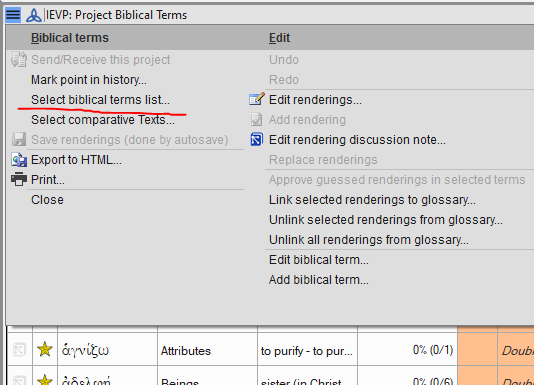
Digamos que eligió “Major Biblical Terms” de la lista de opciones y ahora está viendo esa lista. Puede “marcar con estrella” términos de esa lista (en la columna 2 de la herramienta, haga clic o shift-clic en las estrellas). O, desde el menú, elija “Copy all terms to the XYZ project …” si desea usar todos los términos de una lista que esté viendo. Esa es la forma más rápida de agregarlos todos (vea abajo):
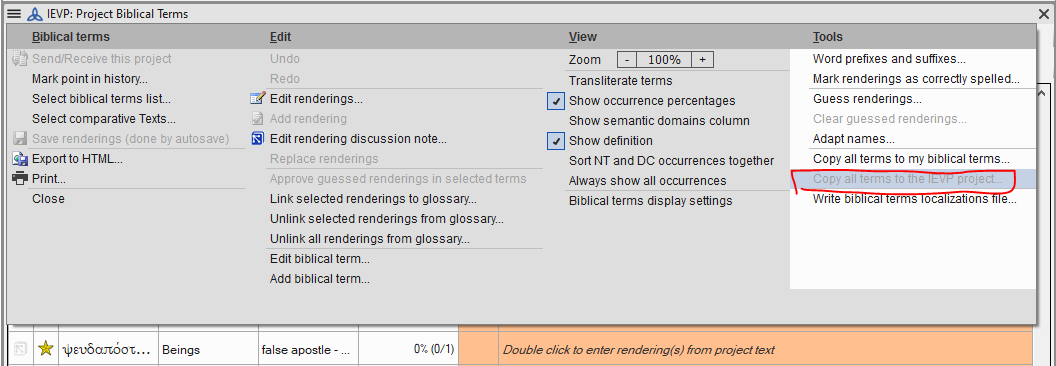
imagen1056×366 28.5 KB
Tendrá que usar Select biblical terms list... nuevamente y elegir “XYZ project biblical terms” desde la parte inferior de la primera sección de la lista para volver a ver y usar su lista de proyecto:
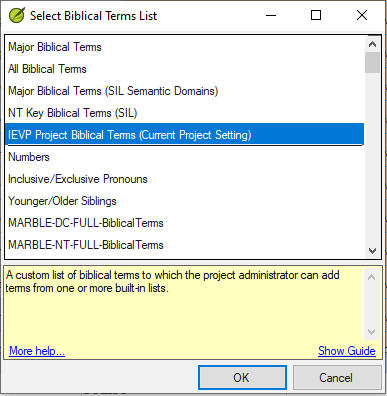
Ahora la ventana de Biblical Terms Renderings no debería verse en gris, debería mostrar todos los términos recién agregados.
También puede agregar otros términos de otra lista, o eliminar términos. Piense en la lista de Project Biblical Terms como una lista virtual que muestra términos de otras listas “reales”.
Hay muchos temas de ayuda en Paratext sobre Biblical Terms. Puede comenzar con “Introduction to the Biblical Terms tool”. paratext.org también tiene muchos videos. El titulado “Project Biblical Terms List: The Basics” debería ser útil.
Before I get started, we’re aware that it is not currently a simple process to add terms to a project. We’re in the process of redesigning the tool.
Blockquote Is it possible that the project Biblical terms list has not be generated.
Yes, it is most likely that your “associated” Biblical Terms list for this project is the Project Biblical Terms list and it probably doesn’t have any terms in it yet:
By default, the Project Biblical Terms list is empty, ready for you to add the terms your project cares about. Terms are added to that list by first selecting a list (which already has terms in it) in the Biblical Terms tool:
Let’s say you chose “Major Biblical Terms” from the list of options and you’re now looking at that list. You can either “star” terms from that list (in column 2 of the tool, click or shift-click on the stars). Or, from the menu choose “Copy all terms to the XYZ project …” if you want to use all of the terms from a list you’re viewing. That’s the quickest way to add them all (see below):
image1056×366 28.5 KB
You’ll need to use Select biblical terms list... again and choose “XYZ project biblical terms” from the bottom of the first section of the list in order to go back to viewing and using your Project list:
Now the Biblical Terms Renderings window shouldn’t look grey, it should show all the newly added terms.
You could also add other terms from another list, or remove terms. Think of the Project Biblical Terms list as a virtual list which displays terms from other “real” lists.
There are many Help topics in Paratext about Biblical Terms. You could start with, “Introduction to the Biblical Terms tool”. paratext.org has many videos too. The one titled “Project Biblical Terms List: The Basics” should be helpful.
Traducción automática desde English








