नमस्ते, मैं Windows 10 में Paratext 9 का उपयोग कर रहा/रही हूँ (Parallels Desktop 16 द्वारा चलाया जा रहा है)। मैं प्रोजेक्ट विंडो में टेक्स्ट इनपुट करने के लिए Keyman कीबोर्ड (Pan African Positional (SIL)) का उपयोग कर रहा/रही हूँ। लेकिन जब भी मैं प्रोजेक्ट विंडो से बाहर क्लिक करता/करती हूँ, यह डिफ़ॉल्ट अंग्रेज़ी कीबोर्ड पर वापस चला जाता है। जब मैं प्रोजेट सेटिंग्स में “Keyboard” पर जाता/जाती हूँ, तो Keyman कीबोर्ड एक विकल्प के रूप में सूचीबद्ध नहीं है। मैं इसे Windows भाषा सेटिंग्स में भी नहीं ढूंढ पा रहा/पा रही हूँ। कोई भी सहायता आभारणीय होगी!
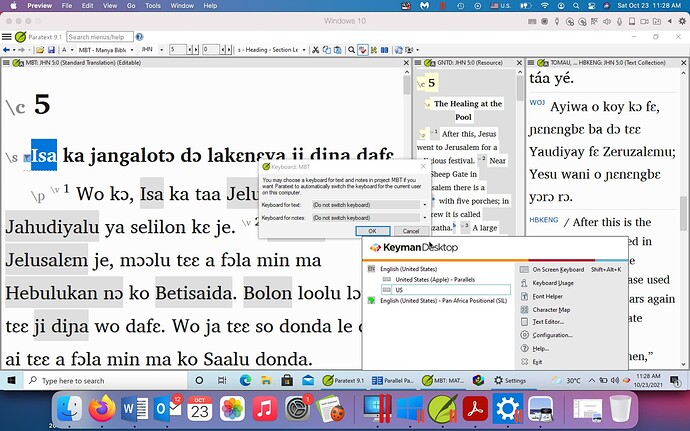
स्क्रीनशॉट1920×1200 219 KB
Hello, I’m using Paratext 9 in Windows 10 (run by Parallels Desktop 16). I’m using a Keyman keyboard (Pan African Positional (SIL) to input the text in the project window. But any time I click away from the project window, it goes back to the default English keyboard. When I go to “Keyboard” in Project Settings, the Keyman keyboard is not listed as an option. I also can not find it in the Windows language settings. Any help would be appreciated!
Screenshot1920×1200 219 KB
English से मशीन-अनुवादित








