關於我們徵求的詳細資訊
Paratext Lite 開發團隊正在尋找一些勇敢的靈魂,他們同時使用 Paratext Lite 和 Paratext 中的 Project Plans(專案計畫),並願意測試 Paratext Lite 中的這個新功能。
運作方式
-
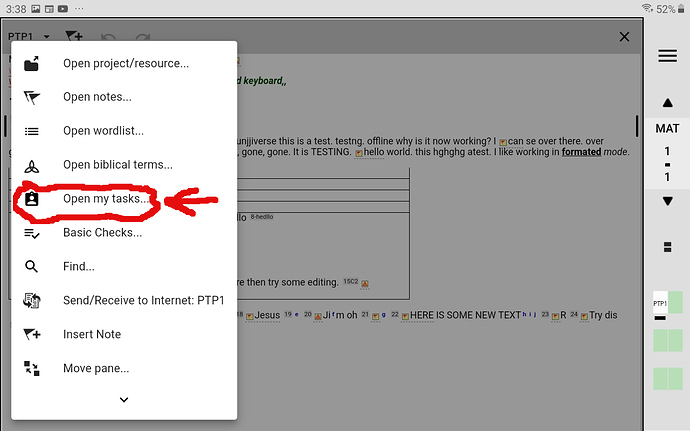
首先,展開專案的工具選單並選擇「Open My Tasks」(開啟我的任務)
MyTasks1280×800 155 KB
-
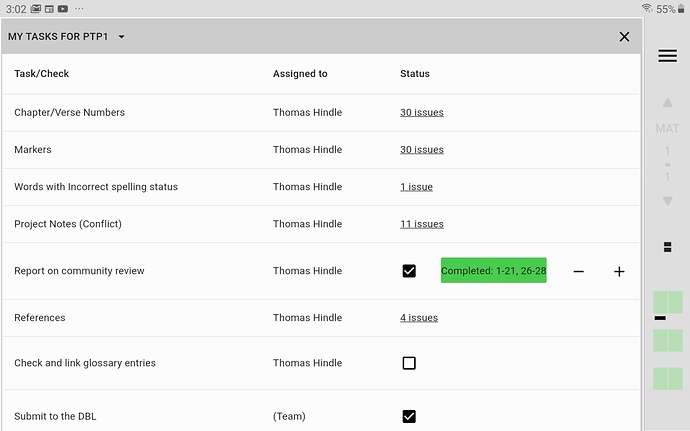
選擇您希望查看 My Tasks(我的任務)的專案後,您將看到此對話框:
My Tasks1280×800 113 KB
-
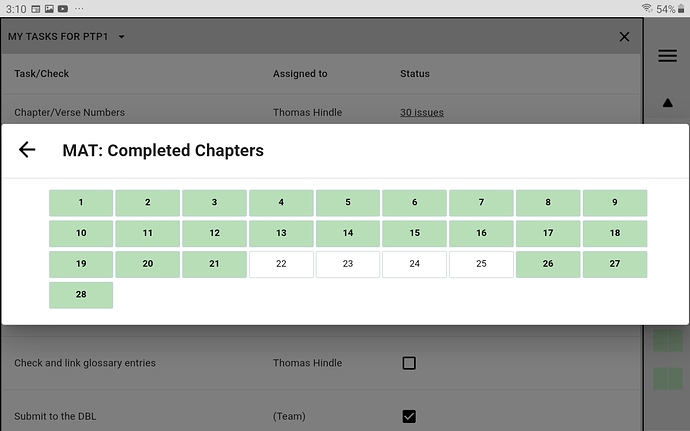
如果您點擊「綠色 Completed task bar」(已完成任務列),您將看到以下畫面:
CompletedChapters1280×800 123 KB
非常感謝您考慮以這種方式提供協助,
anon089134(代表團隊)
Some details about our ask
The Paratext Lite development team is on the lookout for some brave souls who use both Paratext Lite and Project Plans from Paratext and would be willing to test out this new feature in Paratext Lite.
How it works
-
First drop down the tools menu for the project and select “Open My Tasks”
MyTasks1280×800 155 KB
-
After selecting which project you wish to see My Tasks for, you will see this dialogue:
My Tasks1280×800 113 KB
-
If you click on the “green coloured Completed task bar”, you will see the following screen:
CompletedChapters1280×800 123 KB
Thanks so much for considering helping in this way,
anon089134 (for the team)
機器翻譯自 English








